More secure and flexible file downloads for safer file access management
Added a getMimeType($filePath) helper to reliably detect and send files with the correct MIME type.
Extended link.php with a new v parameter so files can be retrieved by name as well as by ID, giving more flexibility when generating download links.
Updated link.php to send files directly instead of redirecting to their path, only after checking user permissions.
Ensured file paths are no longer exposed in responses and allowed
upload directories to be safely placed outside the web server root.
Benefit: File downloads are now more secure, more flexible to
integrate, and better protected against direct URL guessing or leaking
of internal file paths.
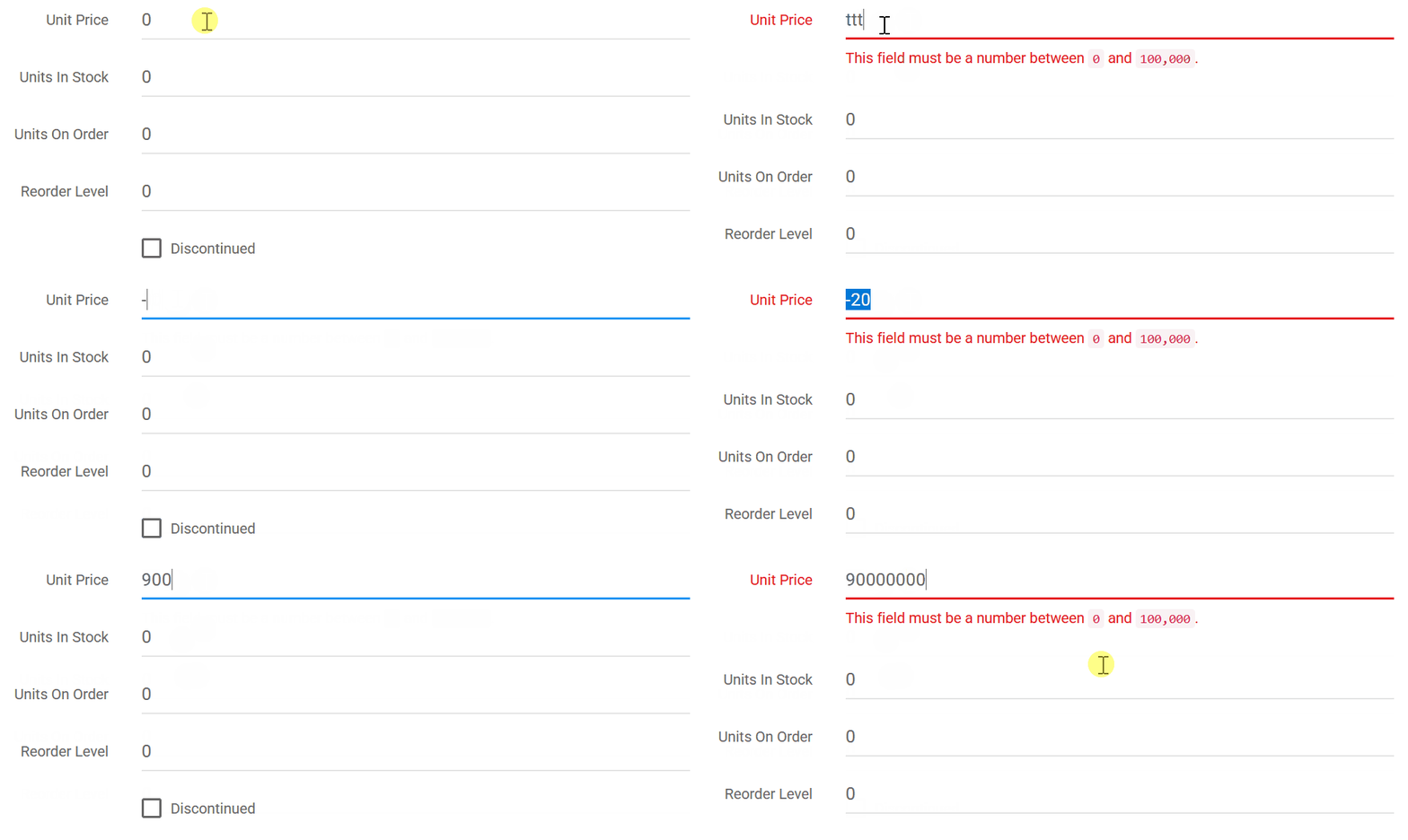
Improved numeric field validation for clearer, more accurate data entry
Implemented live client-side validation for numeric fields so users
see validation feedback immediately as they type, not only after
submitting the form.
Corrected numeric range checks so that minimum and maximum values
are now inclusive, matching typical user expectations and configuration
settings.
Benefit: Users get instant, more intuitive validation feedback on numeric inputs, reducing confusion and data entry errors.
User interface and navigation improvements for a smoother day-to-day workflow
Enhanced styling of the vertical navigation menu for clearer structure and a more modern look.
Improved the appearance of the admin tools button in RTL layouts for better visibility and consistency.
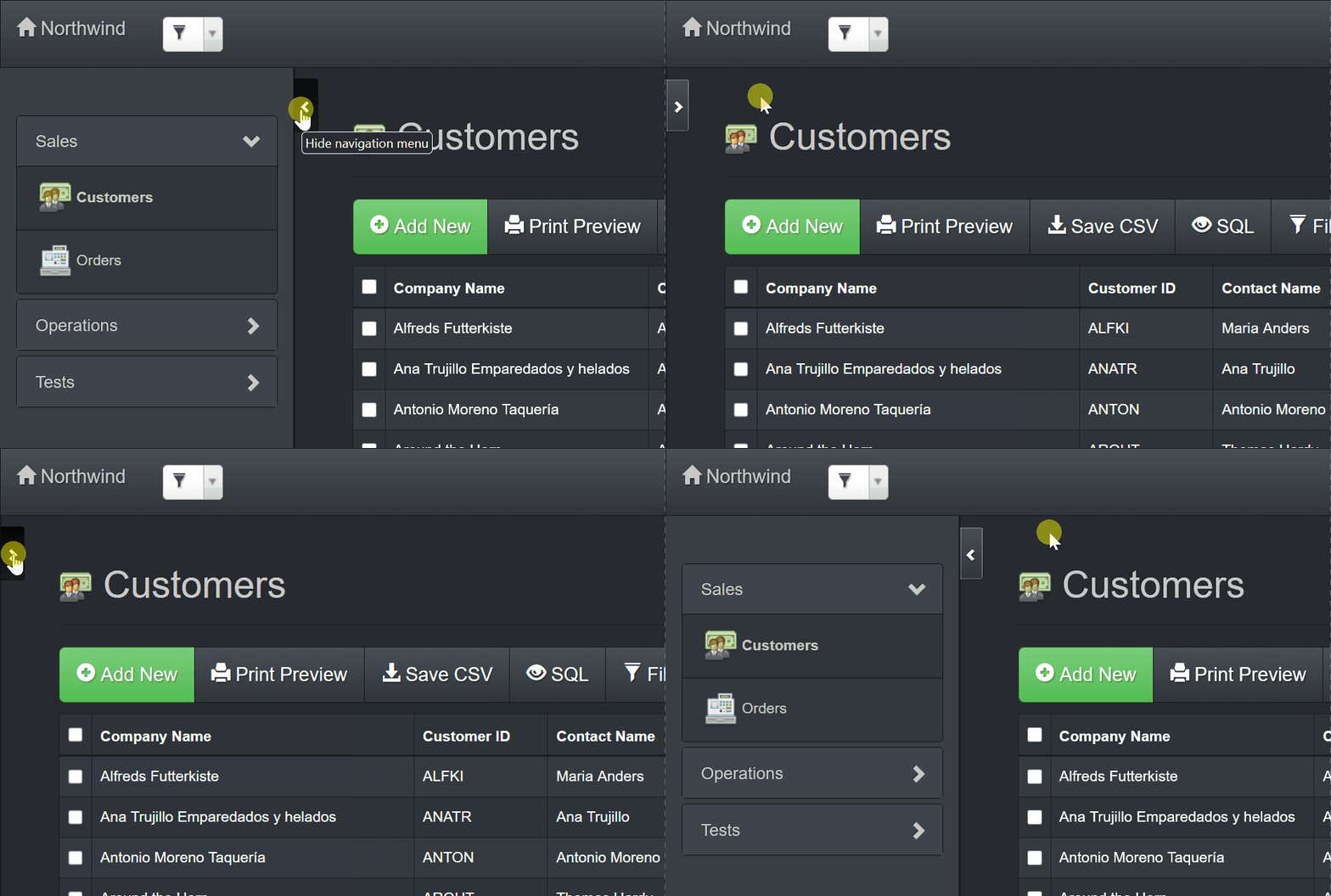
Made the vertical menu toggle button always visible so users can collapse/expand navigation more easily on long pages.
Refined the styling of selected records in table view to make the current selection stand out more clearly.
Added a button to toggle the detail view so users can quickly jump to child tabs without scrolling through long forms.
Benefit: Navigation and record handling are more intuitive and
visually clear, helping users move around large apps faster with less
scrolling and mis-clicks.
Smarter default settings and preferences for quicker, safer app administration
Updated application defaults to show technical docs in the admin
area, use the non-compact paper theme, display SQL errors to admins, and
show the server status page by default.
Enabled saving filters by default for new tables so users can more
easily preserve their frequently used views without extra configuration.
Benefit: New apps start with more helpful defaults for admins and
end users, reducing initial setup time and making troubleshooting and
data exploration easier.
Streamlined RTL and language-related behavior for cleaner configuration
Removed the obsolete RTL option from the project defaults tab, since
RTL is now auto-detected and no longer needs manual configuration.
Updated UI translations to reflect recent wording changes and improvements.
Fixed inaccuracies and a typo in the Slovenian language file to ensure correct labels and messages.
Benefit: Right-to-left and translated interfaces behave more
consistently out of the box, with fewer confusing options and more
accurate language strings.
Safer and more configurable outbound HTTP requests for integration scenarios
Added a sixth optional parameter, $skipCertVerification, to httpRequest() to allow skipping SSL certificate verification when explicitly needed (default remains secure with verification enabled).
Benefit: Integrations with legacy or misconfigured HTTPS endpoints
are easier to set up when necessary, while keeping secure defaults for
typical use cases.
Asset loading and project handling improvements for smoother upgrades
Added a cache-busting argument when loading theme CSS so that style
changes in new releases are picked up immediately instead of being
blocked by browser cache.
Fixed an error that occurred when reading AXP project files in some scenarios, ensuring projects load reliably.
Benefit: Upgrades and theme changes apply more predictably, and
project files open more reliably, reducing downtime and troubleshooting
after updates.
AppGini 26.12, Feb 19, 2026
New features
This is a hotfix release. Major new features (introduced in 26.11) include:
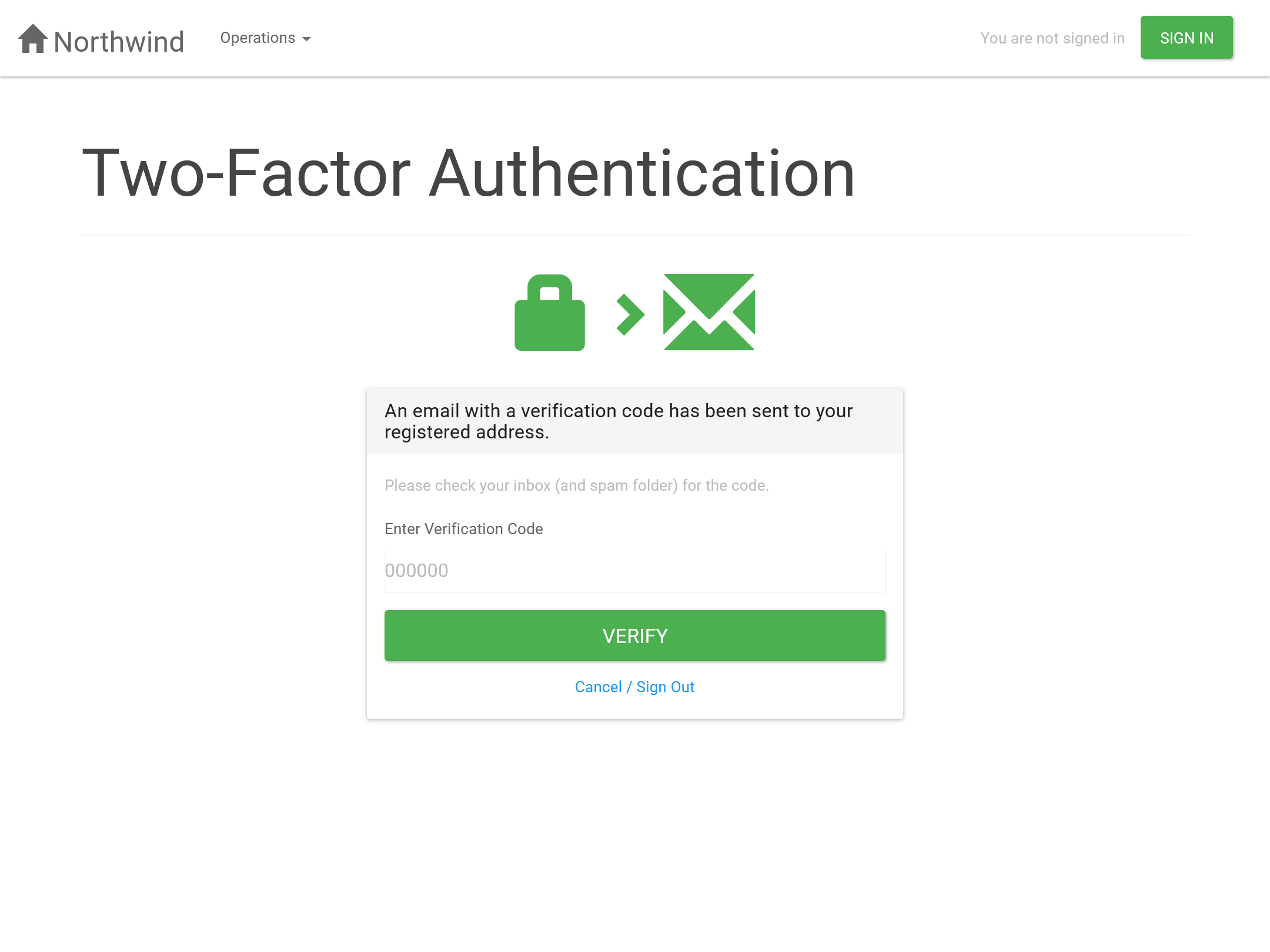
Email-based two-factor authentication (2FA).
Per-user multi-lingual support.
Numeric fields client-side validation.
See the change log for 26.11 for more details.
Bug fixes
Fixed inaccuracies in German language file.
Fixed UI bug introduced in 26.11 causing 'Calculated field' checkbox to be disabled in some scenarios.
Fixed admin page layout bug introduced in previous release.
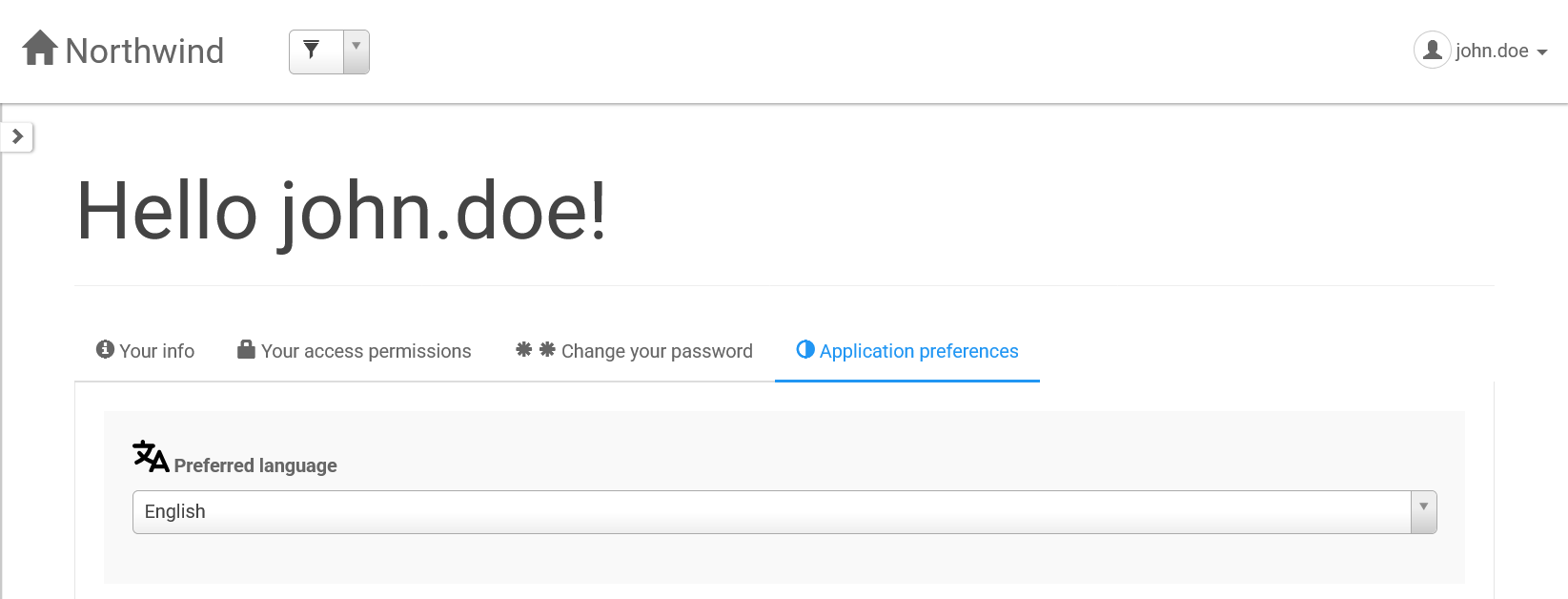
Added full multi-language support so each user can choose their preferred UI language in the profile page (App preferences tab).
Bundled 64 built-in languages and made it easier to add custom
translations, with language files now organized into dedicated folders
that are created and copied automatically during upload and app
generation.
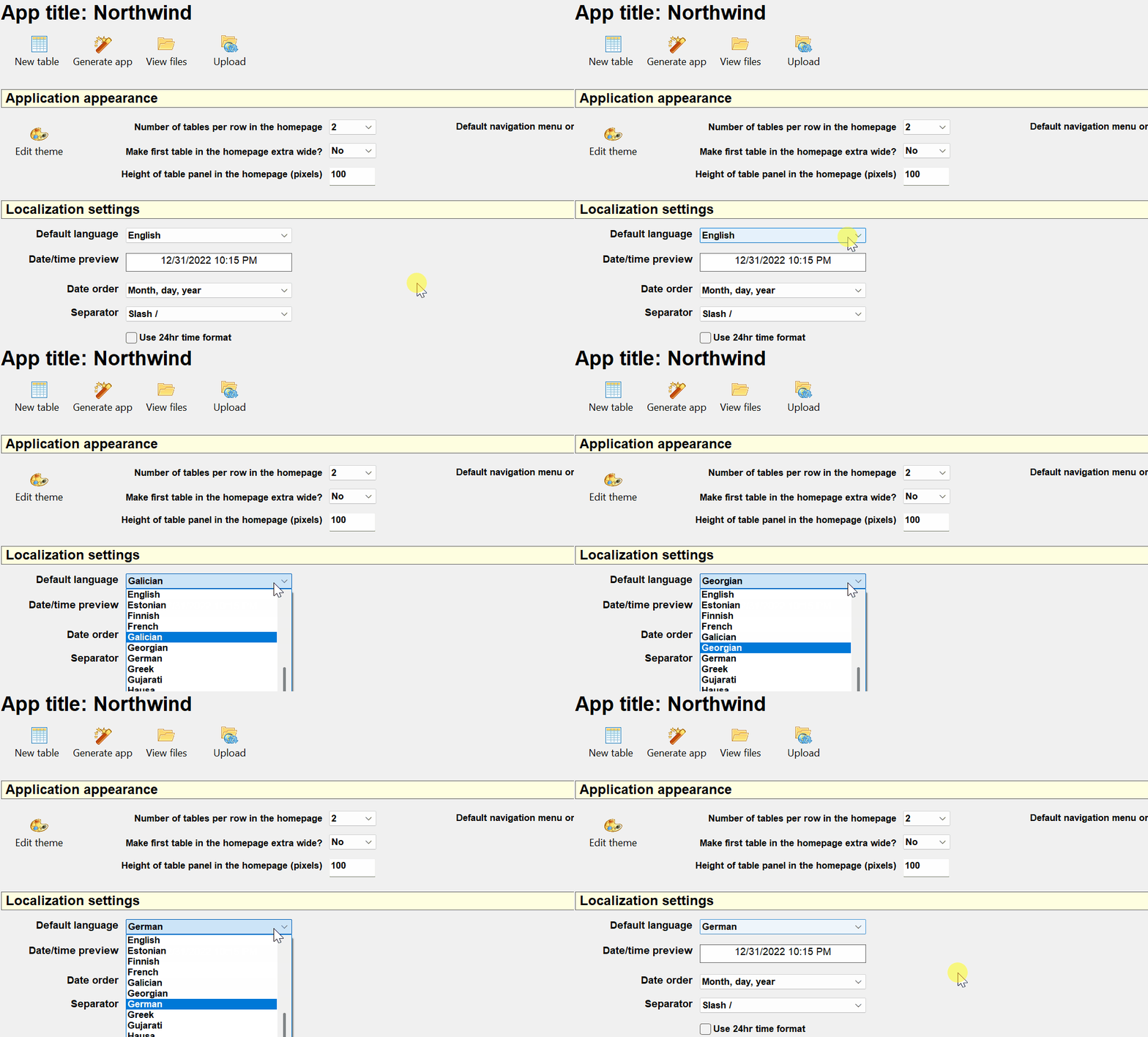
Introduced a default application language setting in the project
pane to control the initial language for setup, anonymous, and new
users.
Enabled automatic right-to-left (RTL) layout detection based on the
selected language, removing the need for a separate RTL toggle.
Ensured all caption settings in AppGini accept full Unicode
characters so labels and titles can use non‑Latin scripts without
issues.
Improved language file handling and caching so translation strings load reliably and stay up to date during setup.
Benefits: You can ship one app that works naturally
in many languages, with correct layouts for RTL languages and fewer
manual steps to manage or update translations.
Benefits: User accounts are better protected
against unauthorized access, and admins can set up and troubleshoot
email-dependent features more confidently.
Smarter numeric field validation to improve data quality and user experience
Added per-field minimum and maximum allowed values for numeric
fields, preventing users from saving records when values fall outside
the allowed range.
Introduced client-side validation for integer, decimal, and float
fields that warns about invalid characters before the form is submitted.
Benefits: Users get instant, understandable
feedback when entering numbers, reducing data-entry mistakes and
avoiding confusing database error messages.
User interface and admin workflow improvements for a smoother, more polished experience
Enhanced the Project properties pane UI to make key settings (including language defaults) easier to find and understand.
Improved the admin homepage layout and, in the Pro edition, added a
direct link to subscribe to the newsletter and browse previous issues.
Standardized keyboard tab order across AppGini screens so moving between fields using the keyboard feels more consistent.
Added support for checking the installed file-uploader script
version and updating it when obsolete, helping keep uploads working
smoothly after upgrades.
Enhanced the test email tool with clearer output and error handling
to help admins verify email settings before enabling 2FA and other
email-dependent features.
Benefits: Building and administering apps feels
more intuitive, with clearer screens, more predictable navigation, and
fewer surprises when configuring uploads and admin tools.
Bug fixes and reliability improvements for more stable generated apps
Fixed an issue where notifications could appear hidden behind the
top navigation bar in some themes, ensuring all alerts remain visible.
Resolved a bug in pages without a .page-header where the vertical navbar script could break and stop subsequent JavaScript from running.
Ensured language files are always updated during setup and cleaned
up older translation-related tools and links that are no longer needed.
Benefits: Generated apps behave more predictably
across different themes and pages, with fewer hard-to-diagnose
JavaScript errors or outdated translation artifacts.
AppGini 26.10, Jan 15, 2026
New features
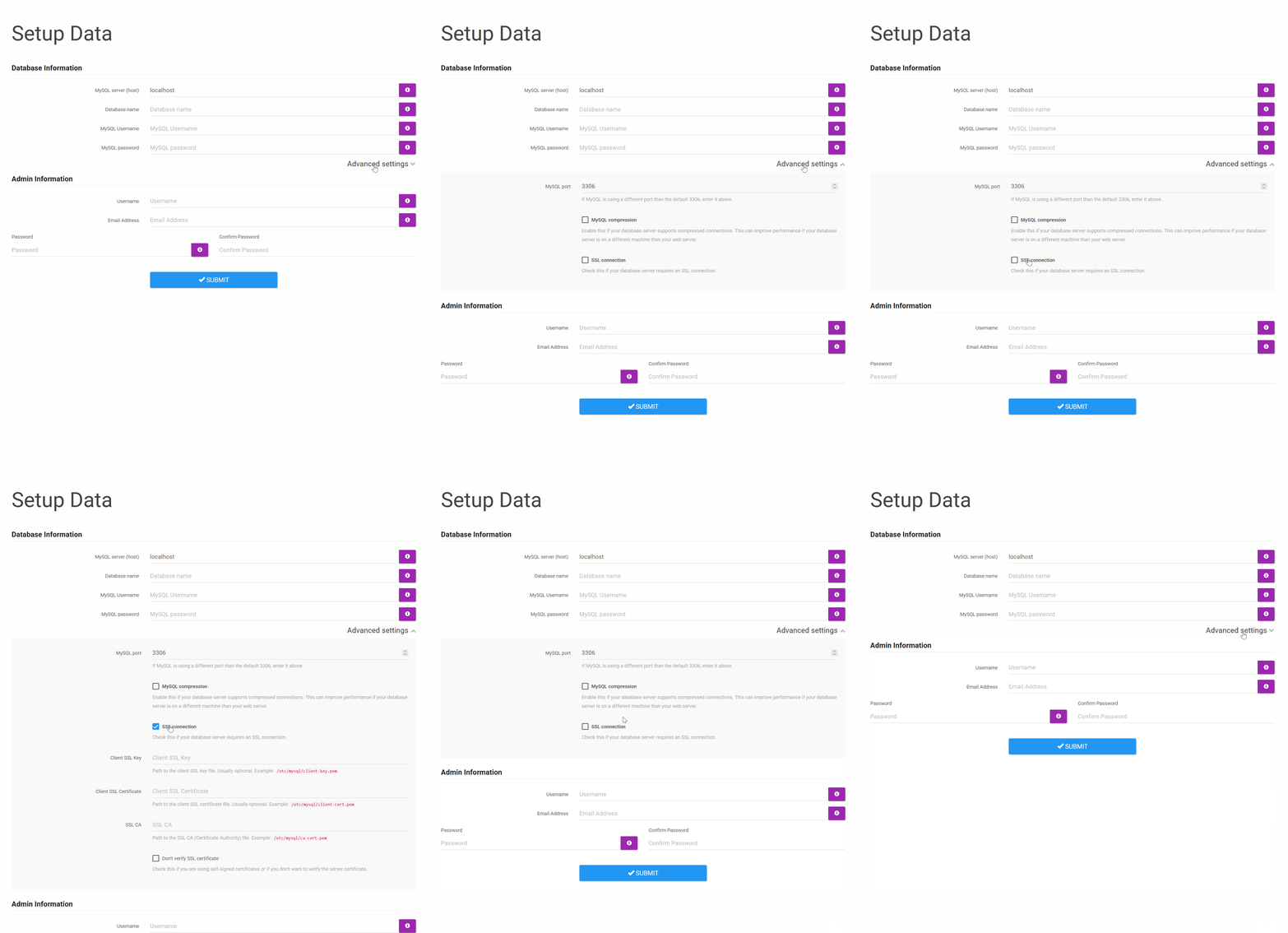
Added new 'Advanced settings' section in setup page, where admin can set SSL options for database connections.
Added 'MySQL compression' option under advanced settings section
in setup. Enable this if your database server supports compressed
connections. This can improve performance if your database server is on a
different machine than your web server.
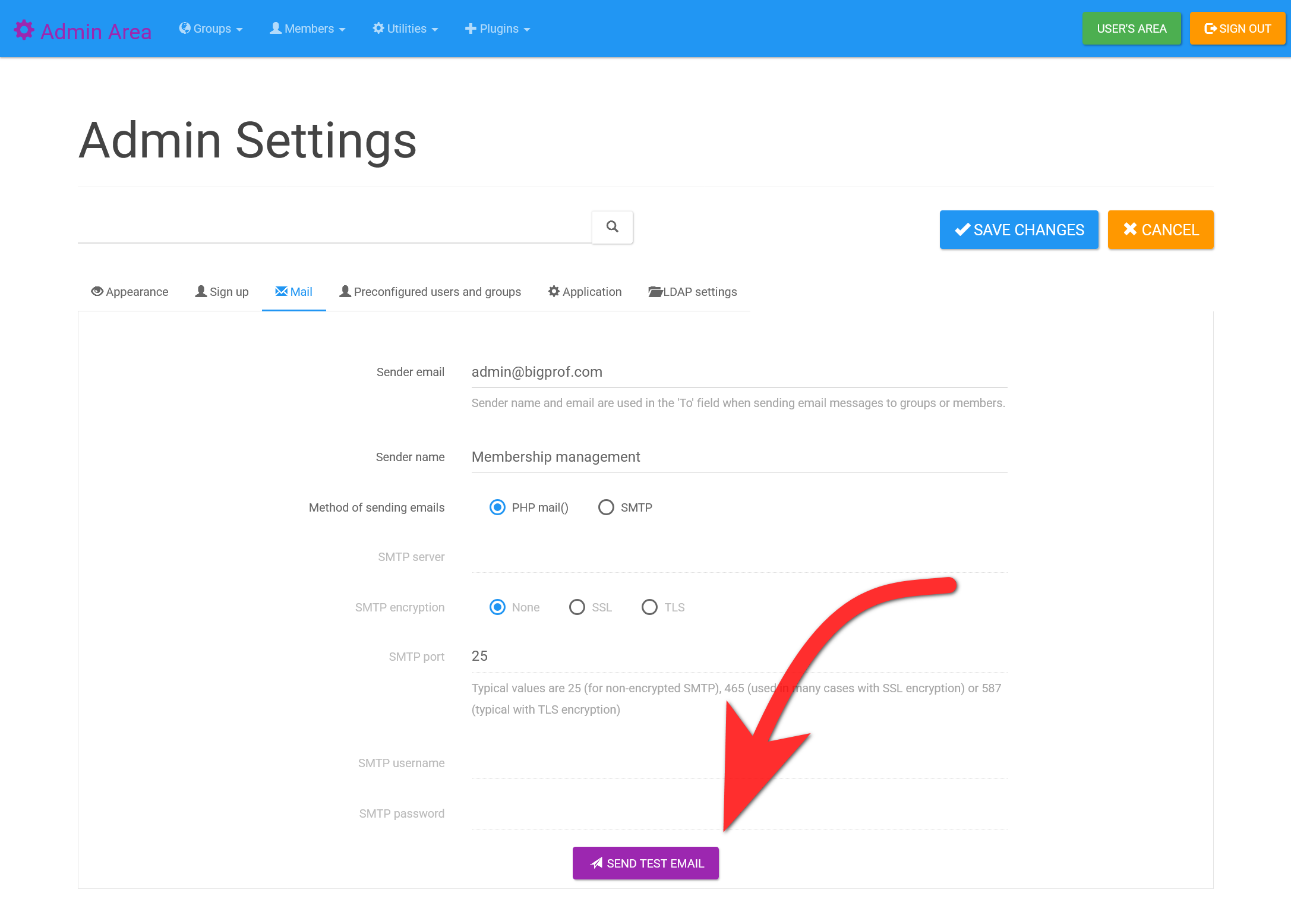
Add feature to send a test email in the Mail tab in admin
settings page. This is a quick and convenient way to test mail settings.
UI/UX enhancements
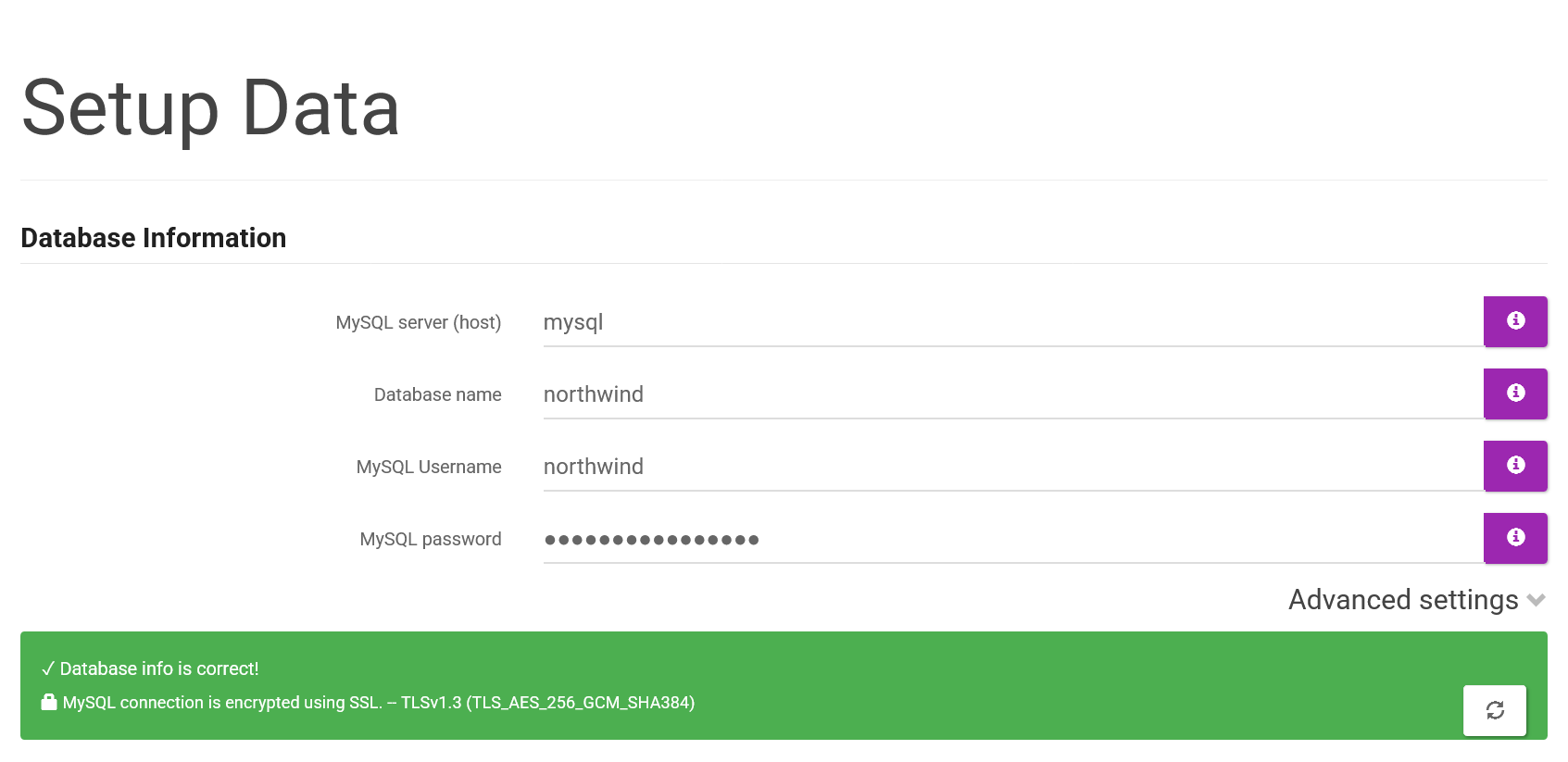
If SSL connections are enabled during setup, the database connection check now indicates whether the connection is encrypted.
Fix vertical nav top padding when saved filters are applied
Enhanced table cell styling for group and member views in admin area
Bug fixes
More resilient application uploader for huge projects (100+ tables):
disable server time limit when calculating hashes. You must manually
upload the new file-uploader.php to apply this fix.
Fixed homepage quick search issue where tables having sum rows
always showed up in search results even when they have zero matches.
Fixed bug when using quick search in a table that has table view and
detail view in the same page (where using quick search caused a warning
about leaving page without saving)
Client-side programmatic improvements
Added .pointer CSS class to change cusrsor to pointer on elements having this class.
AppGini 25.15, Nov 18, 2025
This is a hotfix release amending v25.14 with the following fixes:
Added QUEUE_AJAX_REQUESTS constant to definitions.php to conditionally enable queued ajax requests (disabled by default). To enable it (if you have a slow server), add this line to hooks/__bootstrap.php: define('QUEUE_AJAX_REQUESTS', true);
Fixed warnings about appgini_saved_filters table in rebuild fields page.
AppGini 25.14, Nov 17, 2025
New features
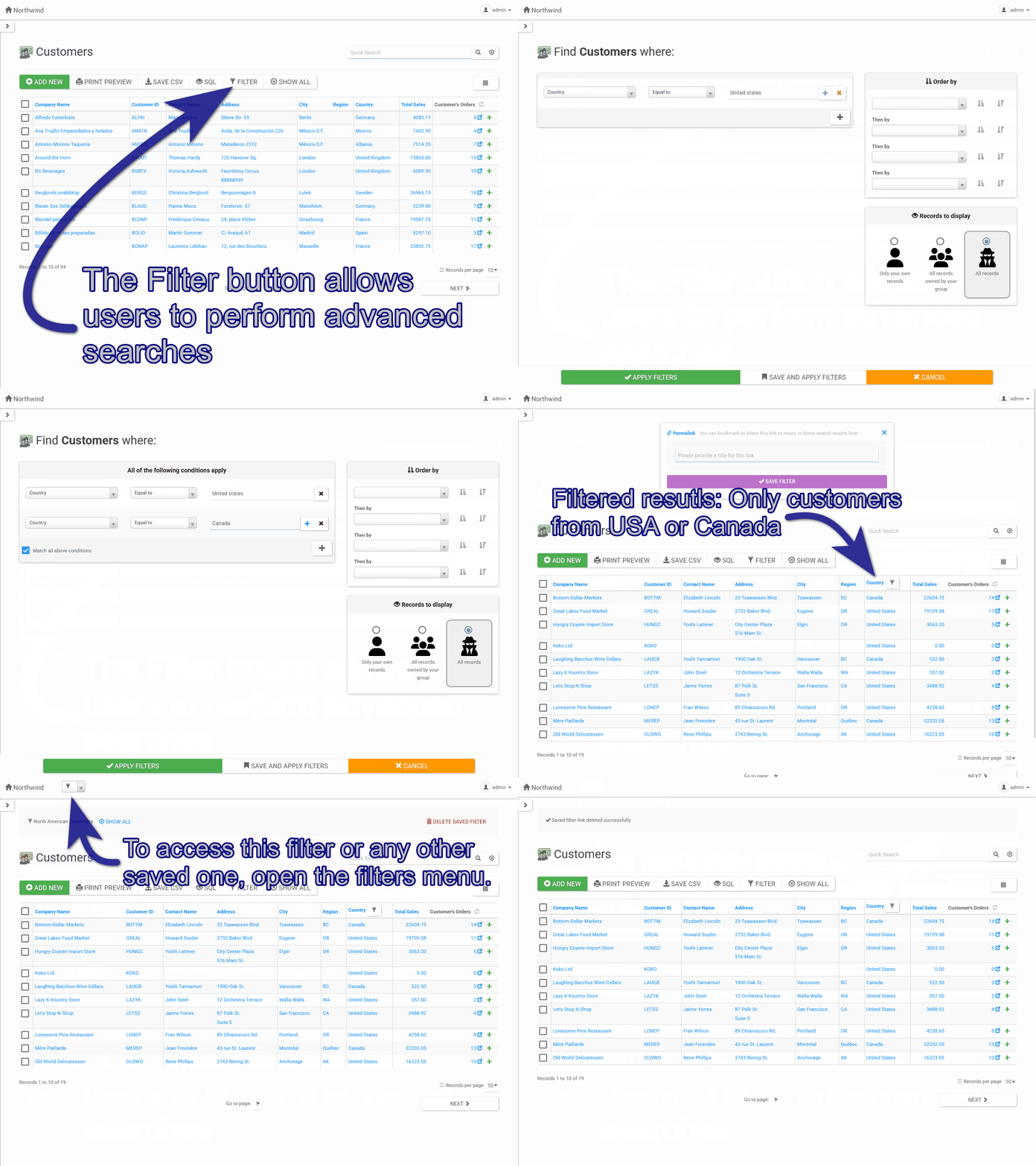
Saved filters: Easily save, retrieve, and manage custom filters for your data views.
Users can now save their frequently-used filters and quickly apply them at any time.
Saved filters for all tables can be readily accessed from all application pages via the filters drop-down.
Instant search in the saved filters drop-down makes it very easy to find a filter by title.
Note: Saved filters work only for logged users since each
user has their own set of saved filters. Guest can't save filters but
can copy or bookmark a permalink.
To change the maximum number of saved filters per user (default: 100), set the MAX_FILTER_LINKS_PER_USER constant in hooks/__bootstrap.php.
To intercept saved filters functionality, you can redefine the JS functions AppGini.handleSaveFilters and AppGini.handleSavedFiltersList in hooks/footer-extras.php.
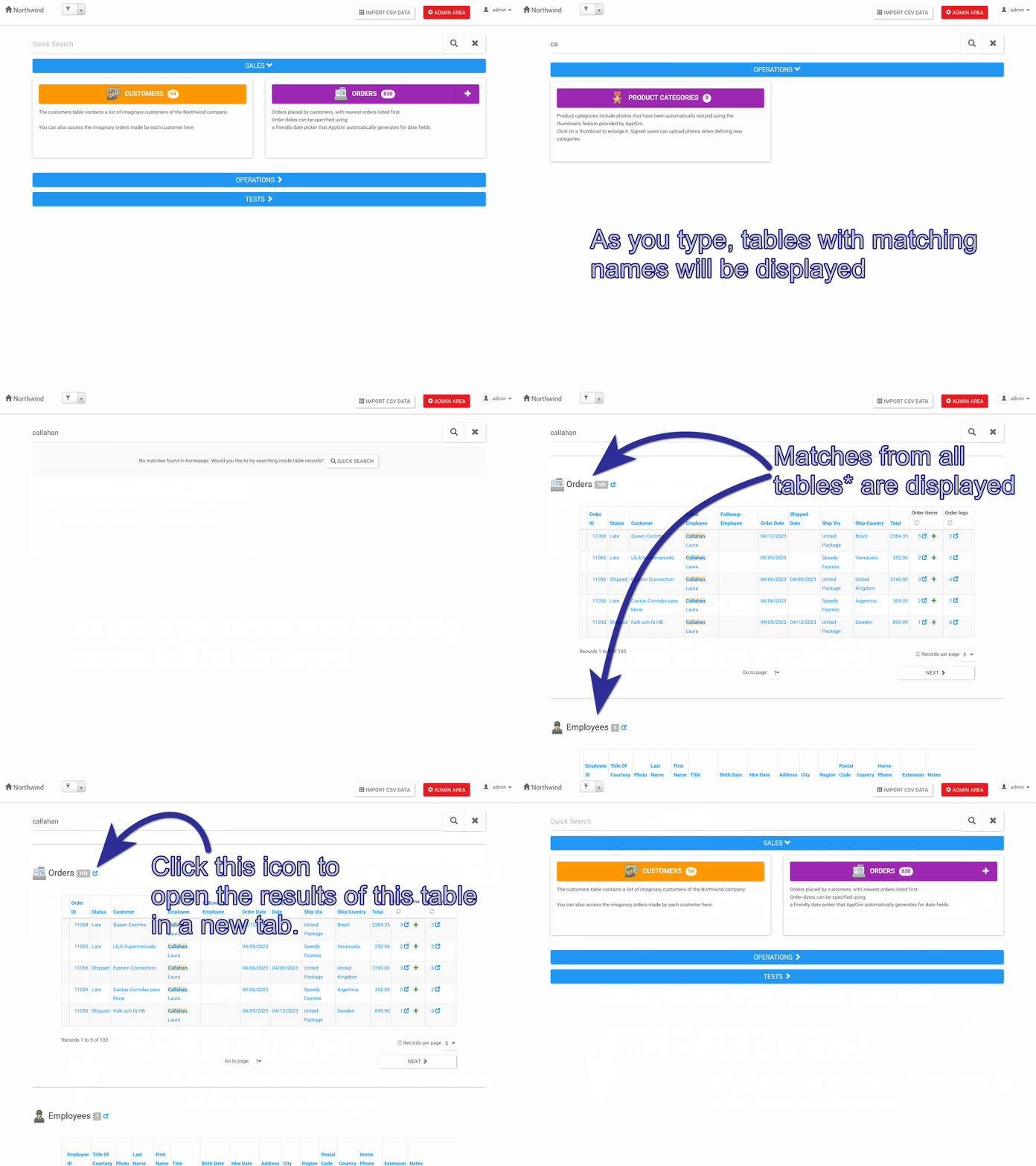
Global search from homepage:
Users can now search across all tables they have access to directly from the homepage search box.
Quickly finding data across all tables has never been easier!
Only the tables and records accessible to the user are displayed in the search results.
If you'd like, for some reason, to disable this feature, set the PHP constant HOMEPAGE_QUICK_SEARCH_TABLES to false in hooks/__bootstrap.php.
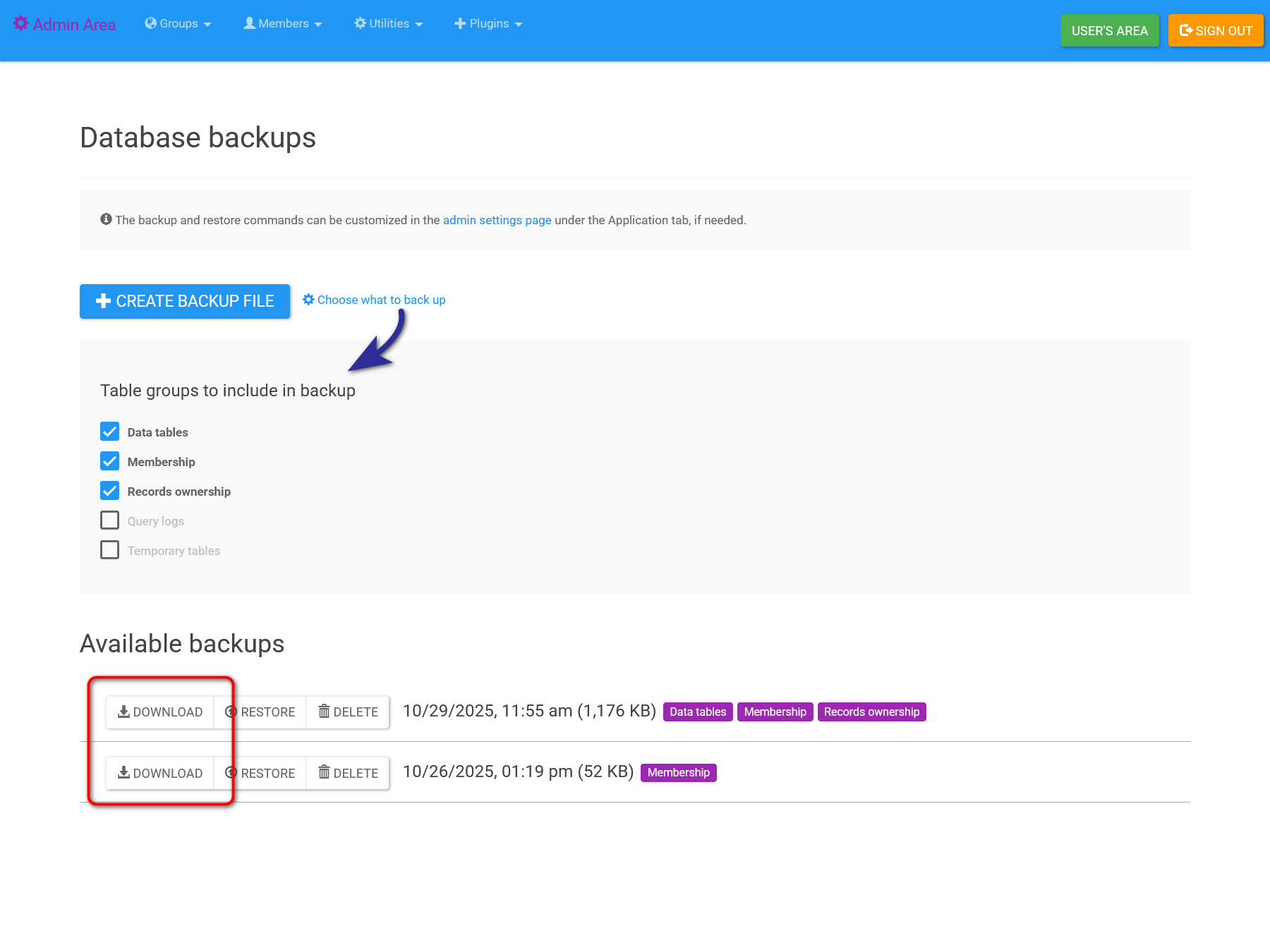
Selective database backup and downloadable backups:
The database backup page now lets you choose which table groups to
include in the backup, and allows you to securely download backup files
from the admin area.
Downloads are safeguarded so that only admins can download the database backups.
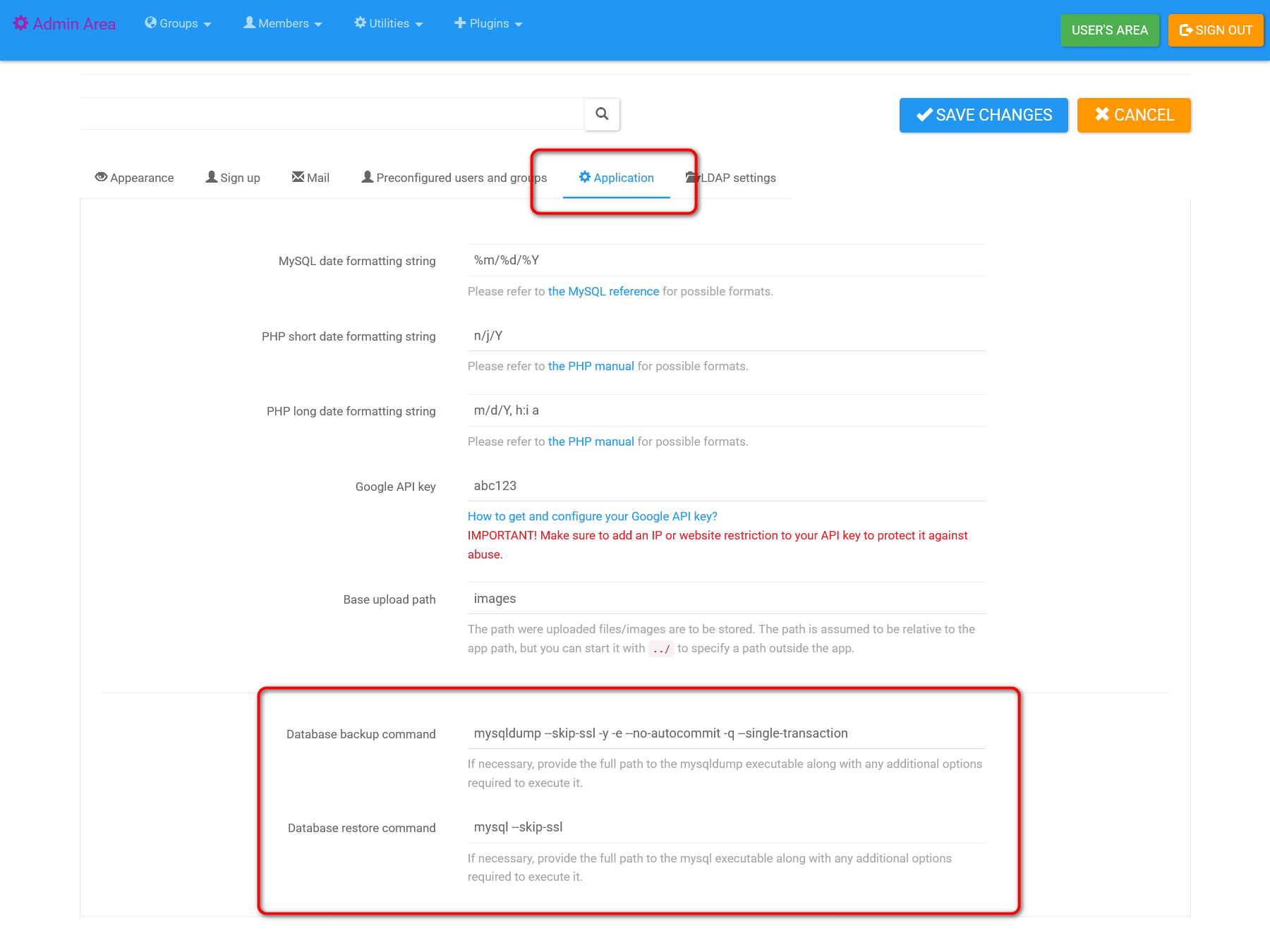
You can now customize the database backup and restore commands from the admin settings page (under the Application tab).
This is especially useful for specifying full command paths, skipping SSL checks, or adding extra options.
Hint: To reset the backup and restore commands to their defaults, simply empty their configured values and save changes.
UI/UX enhancements
Enhanced filters page UI/UX for a smoother experience.
Improved vertical navigation styles and print handling.
Adjusted minimum screen sizing for double and triple column layouts in Detail View (DV) and Detail View Print preview (DVP).
Improved DV form layout to avoid truncating action button text in some screen resolutions.
Improved AppGini loading experience.
Bug fixes
Fixed deprecation error in makeSafe() under certain conditions.
Fixed issues with updating app URL in some scenarios inside AppGini.
Bug fix: Unset autofill lookup fields if no valid parent lookup remains.
Fixed vertical navigation menu behavior in DVP.
Fixed caching issues in AppGini during output folder selection when generating the app.
Corrected path bug in "remember me" cookie.
Fixed bug in password quote field on the backup page.
Added Reply-To header to outgoing emails to correctly reflect the response recipient when some mail servers override the From header.
Fixed issue where auto-closing parent modals didn't work in some scenarios.
Fixed theme preview link inside AppGini.
Security fixes
Improved escaping for translated strings:
Used json_encode instead of add_slashes when inserting translations into JS code.
Properly escape special characters in translated strings when used in HTML attributes.
Server-side programmatic improvements
Included ajax-saved-filters.php in generated files.
Included saved filters table in backups for record ownership tables.
Allowed programmatic adjustment of max saved filters per user (MAX_FILTER_LINKS_PER_USER).
Added ability to customize database backup/restore commands via admin settings.
Client-side programmatic improvements
AJAX concurrency and timeout limits: Now, AJAX
requests are queued by default, with a configurable limit on concurrent
requests and automatic timeouts to prevent server overload.
Adjust $j.ajax.maxConcurrent as needed in your hooks/header-extras.php. The default is 5 concurrent requests, but you might want to decrease this number on servers with very limited resources.
Example AJAX requests:
$j.ajax({ url: "...", ... }); // Queued by default, with default timeout/abort
$j.ajax({ url: "...", abortOnTimeout: false }); // Don't abort if timed out
$j.ajax({ url: "...", queue: false }); // Bypass queue, behave like normal $.ajax
Added AppGini.sanitizeString(str) utility function to remove HTML/JS code from strings, leaving only text content.
Added .dv-form CSS class to DV form container to be easily selectable via js. Also added tablename as data attribute to retrieve table name programmatically
AppGini 25.13, Aug 21, 2025
New features
Added vertical navigation bar support to users area.
The video below demonstrates the new vertical navigation bar in action:
Users can switch between horizontal and vertical navigation bars in the member profile page:
Added option to copy project database schema as markdown for use in LLM prompts (Project menu > Copy schema as markdown).
Added option to copy selected table as markdown for use in LLM prompts (Tables menu > Copy as markdown).
UI/UX enhancements in generated applications
Clicking 'Default theme' in user profile reverts to default navmenu orientation.
Improved clarity of app keyboard shortcuts dialog.
when clicking the children count link of a record in TV, a link
in the modal title is displayed allowing users to open the modal
contents in a new tab in non-embedded mode.
Showing confirmation before leaving unsaved new child record modal opened from TV.
Removed record selectors from TV if opened in embedded mode (in a modal).
The onbeforeunload is no longer triggered when
leaving the parent page due to changes made in a modal. Instead, a
confirmation is displayed in the modal itself if closing without saving.
Refactored admin styles and improved RTL support across multiple pages.
Showing troubleshooting info in case of captcha errors in setup.
Enhanced membership profile page layout with tabbed navigation and improved UI elements.
Improved positioning of navbar buttons.
Fixed date picker display in dark themes.
Preserve filters, sorting, .. etc when clicking the table title in DV to return to TV (same as clicking 'Back').
Don't auto-focus next field in filters page as this disrupts keyboard searching in select2 drop-downs.
Enhanced error handling and notifications in backup restore database page.
Add bottom margin to pagination section for better appearance in TVDV.
Prevent focus in mobile devices to avoid displaying the virtual keyboard and sacrificing screen area.
UI/UX enhancements in AppGini
Add option in project settings to set the default nav menu orientation.
Improved table icon dialog UX.
Improved AppGini speed when handling network dirs by using better caching.
Improved treeview navigation responsiveness for large AXP files.
PgUp moves to same control in previous field/table.
PgDn moves to same control in next field/table.
Expand width of field and table caption in AppGini UI to same as description to allow better visibility of long captions.
Bug fixes
Fixed table icon dialog issues in high DPI screens.
Fixed bug where updating a parent record in a modal launched from
child DV didn't instantly update the lookup field in the child.
Fixed bug where updating or adding a new parent from child TV
doesn't update the correct lookup when 2+ lookups point to the same
parent.
Fixed table icon selection dialog in high DPI screens.
Fixed menu/close icon color in mobile view of various themes.
Fixed curl command issue.
Updated curl request headers and upload logging for better handling of uploads.
Fixed .hidden rule in dynamic.css.
Fixed new lines in client-side translation.
Stripped leading single quote from each field when importing CSV files to AppGini apps.
Security fixes
Prevent direct access to lib.php, footer.php, settings-manager.php.
Server-side programmatic improvements
Added the following table querying functions that return arrays of matching table names: tablesHiddenInNavMenu(), tablesHiddenInHomepage(), tablesWithAddNewInHomepage(), tablesToFilterBeforeTV().
Added VerticalNav class for rendering vertical navbar by calling VerticalNav::html().
Gracefully handle 'groups' being set to '*' in hooks/links-navmenu.php.
Added DEFAULT_NAV_MENU constant for managing default navigation menu items (allowed values are 'horizontal' and 'vertical').
Added HOMEPAGE_FIRST_TABLE_DOUBLE_WIDTH constant for managing homepage first table double width behavior (allowed values are true and false).
Added HOMEPAGE_TABLES_PER_ROW constant for managing homepage tables per row behavior (allowed values are 1, 2, 3 and 4).
Added HOMEPAGE_PANEL_HEIGHT constant for specifying homepage panel height in pixels (allowed values are positive integers).
Added FILTER_GROUPS constant for managing the maximum number of filter groups (allowed values are positive integers).
Client-side programmatic improvements
Added cache option to AppGini.lookupText function, a boolean to control whether to use local cache before sending request.
When adding escape-embedded CSS class to links that have modal-link
class, a link to open the modal content in a new tab is appended to the
modal title, allowing users to open the modal in non-embedded view.
Refactored children count CSS classes for consistency: children-count link changed to children-count-link, and count-children span changed to children-count. This
is a breaking change if you have custom code depending on these
selectors. Update the selectors accordingly in your custom code.
Adjusted modal_window(options) function so that the passed options object accepts an optional beforeClose callback to execute right before closing the modal. The hide.bs.modal event object is passed as argument. If this function returns false, the modal is not closed.
Passing the shown.bs.modal event object to show callback if provided in the options object when calling modal_window().
Passing the hidden.bs.modal event object to close callback if provided in the options object when calling modal_window().
Added AppGini.getModal() function to return the currently open modal element, or null if no modal is open.
Added AppGini.isEmbedded() function to return true if the current page is embedded, false otherwise.
Added AppGini.localStorage class which provides a safe, namespaced, and JSON-friendly wrapper for working with localStorage.
Admin area button now selectable via .btn-admin-area selector.
Added CSS variable --navbar-border-color for setting vertical navbar border color, with theme-specific values. Can be customized via hooks.
Added AppGini.darkTheme() and AppGini.lightTheme() functions that return a boolean indicating whether current theme is dark or light, useful for styling custom page components.
Wrapping users area page content in div.main-content via header and footer for easier programmatic access.
Loading client-side translations in admin area.
Other changes
Removed obsolete CSV import utility from admin area (the much better
user area CSV import tool has been the default since AppGini 24.10).
Enhanced service worker: improve caching strategy, add navigation preload, and refine fetch handling.
Caching Kufi fonts in service worker.
Included curl command in upload.log (the upload key is stripped from the logged command).
Added maxlength attribute to textareas, rich text,
numeric and time fields to prevent users from entering more than the
allowed number of characters.
Fixed some layout issues for navbar buttons and text.
Add some missing help entries in project properties window
If guest tries to access profile page, they're now redirected to login page, with 403 status (instead of home page previously).
If logged user tries to access sign-in page, they're now redirected to homepage to avoid confusion.
Fixed font size of calculated field query (was too small on some screen resolutions)
Enhance nicEditor (rich text editor) icons and styling for clarity in various themes
Bug fixes
Fixed bug with detecting content of required rich areas.
Fixed error in apply_persisting_children() that occured in detail view print preview pages that have child tables.
Fixed reported html validity issue in WindowMessages class.
Fixed field focus when DV is inside a modal window
Graceful abort when unable to load AppGini config due to multiple AppGini processes
Fixed repeated error message related to reading AppGini config when 2 or more instants of AppGini are open.
Fix clipboard content indicator
Security fixes
Revamped client-side password strength checker to be more robust, and to prevent using common passwords.
Server-side programmatic improvements
Added FILTERS_PER_GROUP constant to definitions.php.
This constant defines the maximum number of filters that can be added
to a single group in the filters page. The default value is 4.
Added cleanUpMembershipUserRecords() to clean up membership_userrecords table by removing records that no longer exist in user-space tables.
Client-side programmatic improvements
Added AppGini.config.appTitle to retrieve the application title via client-side JS.
Refactored common.js to use AppGini.config.appTitle instead of hard-coded app title.
Added AppGini.handleLightbox() function to replace
Lightbox library with a bootstrap carousel in a modal window.
Initializes the lightbox functionality for elements with data-lightbox attributes. If you have custom code using Lightbox, make sure it has a data-lightbox attribute in order for it to continue working.
Removed prototype.js, Scriptaculous and Lightbox JS components to reduce page load time and improve client-side performance.
BREAKING CHANGE: If you have custom code that depends on any
of these components, you need to rewrite it to remove those dependencies.
Updated the source code documentation for modal_window() to JSDoc style (works better with VSCode).
BREAKING CHANGE Added AppGini.noDVPanel() to prepend xs-
to all panel classes in DV in mobile view. If you have custom code
depending on panel classes in DV, you need to adjust selectors
accordingly.
Apply AppGini.config.timeFieldMinutesStep to time picker popup in addition to input group buttons.
Updated AppGini.focusFormElement to accept an optional third parameter so that it becomes AppGini.focusFormElement(tn, fn, noDelay). If noDelay is set to false,
a delay of 500 msec is applied before focusing, which is useful for
focusing elements inside modals after waiting for the modal to fully
load.
Added new hidden-browser CSS class to hide an element in browser mode, showing it only if the app is running in standalone (PWA) mode. Also added hidden-standalone, hidden-pwa and hidden-app CSS classes to show an element only in browser mode, hiding it in standalone (PWA) mode.
Other changes
Refactored dynamic.css to consolidate rtl rules, compact rules, and mobile-specific rules
Added option in AppGini setup to launch AppGini after setup has finished
AppGini 25.10, Feb 10, 2025
New features
Video fields now support, in addition to YouTube, Vimeo, DailyMotion, and direct video URLs.
Display action buttons in time input fields to
quickly set to current time, clear, increment or decrement (the time
picker is still accessible by clicking the field as usual).
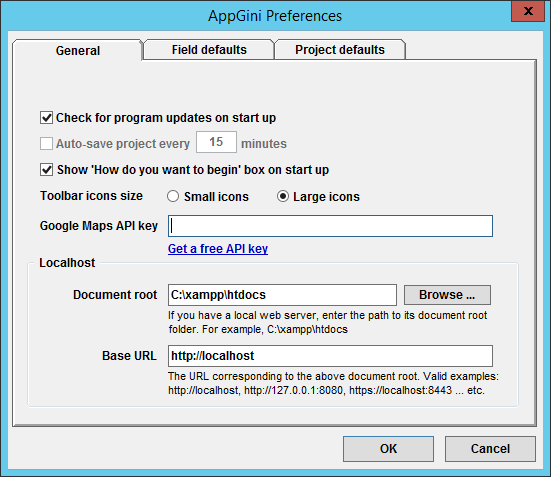
Add table default settings in preferences dialog
to set default settings for new tables to control: table icon
suggestions, allowing CSV exporting, displaying detail view in a
separate page, hiding 'Save as copy', adding new records from the
homepage, and showing record count in the homepage.
UI/UX enhancements
Enhanced email/web link appearance in DV
Perform uniqueness check before submitting records (whether new
or existing), and allow empty unique fields (unless they are marked as
required).
When saving a copy of a record that contains unique fields, a
unique check is now performed before submitting the form (instead of the
old behavior of seeing an error message after submission and having to
go back to fix it).
Make RTL tip clickable to open app theme dialog in AppGini.
Bug fixes
Raise error during app generation for DV-hidden/read-only PK fields
that are not auto-increment, since users can't set their value, leading
to breaking form submission.
Fixed behavior of yes/no buttons in the confirmation message for deleting a record that has children when displayed in a modal.
Fixed issue with updating children count in table view when the count becomes 0.
Fixed error in special member permissions page (admin/pageEditMemberPermissions.php) in PHP 8.x
Server-side programmatic improvements
Added showSQL() function to return true if the current user is an admin and revealing SQL is allowed, false otherwise.
Client-side programmatic improvements
You can set AppGini.config.disableTimeFieldQuickActions to true in one of the hook files that accept JS to disable time field quick actions
You can set AppGini.config.timeFieldMinutesStep to the number of minutes to increment/decrement the time by in time input fields. Default is 5.
Refactor jQuery calls to $j for consistency
Added AppGini.selectedID() function to retrieve the ID of the currently selected record
Added AppGini.checkUnique(tableName, fieldName, excludeSelectedID = true, async = true) to check if user-provided value of a field is unique in the table.
In DV, defined a global array {tablename}UniqueFields containing the names of unique fields in the current table, if any.
Other changes
Added download functionality for server status in 'Server status' page to assist in debugging user-reported issues
If AllowAdminShowSQL option is enabled, include SQL query in json response of parent-children.php for admin user.
AppGini 24.19, Dec 18, 2024
New features
Continuous deployment: Support for new command line parameter --upload [url]
to allow automated (non-interactive) uploading of AppGini apps to
arbitrary URLs (perfect if you need to deploy the same app to multiple
locations).
Added new project property Copy children asynchronously using curl under Security and technical settings
to control whether to copy child records using curl (asynchronously) or
internally through PHP (synchronously). Some users reported that
copying children using curl is not working on their servers, so
unchecking this option should fix this issue by using PHP (though it
might be a bit slower)
UI/UX enhancements
Warning users before leaving the detail view form with unsaved changes using beforeunload event.
Improved treeview redraw performance on pasting a copied field.
Bug fix: clicking DV title returns to TV rather than no action.
Better error exposure during automated execution (when using AppGini command line parameters)
Many improvements to the app uploader dialog
Displaying the configured upload url (specially useful when using --upload command line parameter and specifying a different app url than the default one).
Faster checking for changed files during app uploading (by ignoring irrelevant subfolders).
Checks are started automatically, then a button is shown to proceed, showing the number of changed files to upload.
Improved error reporting and suggestion of fixes.
Preventing the display of skipped (unchanged/ignored) files in upload list for simplicity.
Focusing the most probable next action button so that clicking Enter executes the most probable next action.
Added button to retry uploading failed files (to avoid the frustration of waiting for rechecking file changes).
Disabling upload/browse/run locally buttons in 'App generate' dialog in case of errors.
Screen DPI is now set per monitor in AppGini (Windows 10+).
Added hint in Parent/children settings dialog
that copying of child records works only for child tables that have an
auto-increment primary key and don't have fields set as unique.
Added timezone search to the timezone dialog to help find the desired timezone faster.
Bug fixes
Fixed applying image icon to image fields in AppGini treeview pane.
Fixed column widths in TV to respect configured values.
Proper app exit (preventing ghost AppGini processes persisting in memory under some circumstances).
Fixed bug preventing proper display of error messages in the table
view due to page reload in the case of customized records per page.
Fixed lookup field errors when a filterer field is removed.
Server-side programmatic improvements
Added generic tableInsert($tableName, $data, $recordOwner, $errorMessage) which inserts a new record in a table, performing various before and after tasks.
Added pkIsAutoIncrement($tableName) to check if given table has an auto-increment primary key or not.
Added appDir($path = '') function to return absolute app path with the optional provided path appended to it.
Refactored {tablename}_insert() functions to use tableInsert().
Refactored various parts in generated PHP code to use getRecord().
Client-side programmatic improvements
Added allow-top-navigation-by-user-activation to iframe sandbox permissions to allow users to click links in modals that target the parent window.
Code refactoring in various locations.
Other changes
Updated context help for column width for accuracy.
When generating an app, all errors are now displayed together in the
status window rather than only the first one found. This helps save the
time and frustration of having to fix the reported error, then retry
generating to see if more errors exist.
Applying caption change correctly on renaming a pasted table/field.
Auto-suggesting a table icon based on table name (if it has an exact match with an available icon name).
Applying updated table icon instantly after renaming a table.
When renaming tables/fields, captions are updated accordingly if they haven't been manually set by user.
When defining a new lookup field, the parent table now displays the
corresponding child tab by default, without having to manually configure
it.
Generating file-uploader.php regardless of whether app URL is set. This avoids user confusion.
Calculated fields in the detail view are now automatically updated
after updating child records, without having to refresh the page.
Stripping unnecessary params in URLs when reporting query errors
that occur in the interactive SQL page. This simplifies error reporting
by removing some noise from the query logs page.
Added titles to the homepage search box components for better accessibility.
Bug fixes
Displaying an error during app generation when a calculated field query is not a SELECT query.
Added support for CURRENT_TIMESTAMP() (with parenthesis) when comparing field definitions in pageRebuildFields.php.
Fixed appgini_query_log.datetime field definition to prevent error reported in pageRebuildFields.php.
Fixed bug where child tab title was not updated on renaming child table.
Security fixes
Prevented a reflected XSS vulnerability in browser_window_id parameter.
Using Content-Security-Policy header rather than X-Frame-Options (which is deprecated) for click-jacking protection.
Server-side programmatic improvements
Add stripParams() function to selectively strip params from a given URL/URI.
AppGini 24.16, Jul 09, 2024
This is a hotfix release to fix a bug in setup.php that was discovered in the previous release. If you are using AppGini 24.15, please upgrade to this version to fix this issue.
AppGini 24.15, Jul 04, 2024
New features
Users can now specify the number of records per page and persist their choice per table.
To override the default records per page options, set AppGini.config.recordsPerPageOptions as an array of integers in hooks/header-extras.php or hooks/footer-extras.php.
UI/UX enhancements
Added Open in browser button to the right of App URL box to easily launch the app with one click.
Removed meaningless record count line when no matches found in table view:
Fixed homepage buttons height in some themes.
Fixed overflow issue with datetime picker in multiple column layout.
Added info icon for each table in the rebuild fields page to show CREATE TABLE SQL:
Improved UI of rebuild fields page for better readability.
Fixed YouTube video dimensions not following configured ones.
Quick search is now preserved after leaving the filters page and the print preview page.
Bug fixes
Fixed appearance of radio lookups when user has no edit access.
Fixed bug where datetime and time pickers where not displayed for users with no insert access.
Fixed bug in rebuild fieds page when comparing fields where the default is set to CURRENT_TIMESTAMP.
Fixed NaN error in numeric fields when browser language is Arabic.
Fixed very wide form elements overlapping other elements in multi-column layout.
Fixed bug in opening divs in embedded TV.
Server-side programmatic improvements
parseTemplate(): Stripping empty and comment lines when parsing TV templates for a cleaner output code.
Refactored DML _form() functions to perform all authorizations before other logic.
Added code in updateDB.php to set up internal appgini_* tables.
Added createTableIfNotExists($tableName, $returnSchemaOnly = false) to create specified table name if not already present in the database.
Pass true as a second parameter to just return the CREATE TABLE SQL code without executing it.
Refactored CSVImport class to use createTableIfNotExists() and addIndex().
Refactored updateDB.php to use createTableIfNotExists().
Refactored update_membership functions to use createTableIfNotExists().
Added second optional flag to getTableList() and get_table_fields() to return internal tables.
Client-side programmatic improvements
To override the default records per page options, set AppGini.config.recordsPerPageOptions as an array of integers in hooks/header-extras.php or hooks/footer-extras.php.
Improved pages load time and performance by moving js language code (AppGini.Translate) to a separate lang.js.php file.
Moved js code of $pagesMenu to AppGini.preparePagesMenu() in common.js.
Added AppGini.renderTVRecordsPerPageSelector() to render the Records per page dropdown (can be overwridden to disable this feature if needed).
Added AppGini.currentViewIs() to confirm current view.
Other changes
Included internal tables in the rebuild fields page.
Updated context help for 'records per page'.
AppGini 24.14, Jun 04, 2024
New features
Option to copy group permissions from another group when creating a new group or editing an existing one in the admin area.
Added support for specifying a time offset as the default value for datetime and timestamp fields.
UI/UX enhancements
Add user-configurable option to switch the DV (and DVP) layout
between single, two and three column layout. Can be remembered
separately for each table.
2-columns layout is applicable only for screens wider than 1200px.
3-columns layout is applicable only for screens wider than 1700px.
Enable embedded table view and show next/previous navigation buttons in the detail view when in embedded mode
Open child records in a modal rather than a new browser tab when
clicking the child records count from the table view of the parent
Add Ctrl hint to tooltip of Generate, Move up and Move down toolbar icons.
Disable/enable 'overwrite all' and 'skip all' buttons in files
list dialog based on status of selected files. This works as a quick
visual indicator to the user that all the files are already checked or
unchecked.
Enhanced 'How would you like to begin your work' dialog, and added a link to download example projects.
Bug fixes
Hide 'Print preview detail view' batch command from 'More' menu if detail view is disabled.
Bug fix: hide 'Preview' button for parent records in child detail view if parent detail view is disabled.
Fixed bug in table view print preview where clicking a thumbnail causes a modal with infinite loading and a 'undefined' error.
Fixed ESC button behavior in upload status dialog to close dialog rather than open help.
Server-side programmatic improvements
You can display the navigation menus in the homepage by adding this code to the hooks/__bootstrap.php file inside a PHP block:
define('HOMEPAGE_NAVMENUS', true);
Used DIRECTORY_SEPARATOR instead of / in getUploadDir()
Moved getUploadDir() source docs to admin/incFunctions.php
Added isDetailViewEnabled($tn) function to return a boolean indicating if the detail view of given table name is enabled.
Fixed/updated links in generated hooks source code documentation.
Added Request::datetime() method to handle submitted datetime values.
Added parseMySQLDateTime() PHP function to validate datetime values, and handle time offsets.
Client-side programmatic improvements
Added AppGini.renderDVLayoutToolbar() function to render the detail view layout toolbar (can be overridden for custom rendering).
Added AppGini.applySingleColumnLayout(), AppGini.applyDoubleColumnLayout() and AppGini.applyTripleColumnLayout() functions to apply the corresponding layout to the detail view.
Added AppGini.storedLayout() function to get/set the stored layout for a given table and view.
Other changes
Updated data type guidelines to be more informative and include date and time offsets.
AppGini 24.13, May 05, 2024
New features
Implement live search in homepage to quickly find a table or table group.
UI/UX enhancements
Press Ctrl while clicking the 'Move up' icon to move table/field to the top when sorting tables/field in AppGini.
Press Ctrl while clicking the 'Move down' icon to move table/field to the bottom when sorting tables/field in AppGini.
Refactor 'Move up' and 'Move down' for faster sorting without redrawing the treeview, and with preserving expanded tables.
Fix truncated text in Google map options dialog in high DPI screens.
Bug fixes
Fix issue with formatting numbers when locale is German (de-DE).
Fix quick search not highlighting matches in non-default table view templates.
When renaming a field with a magic/smart name, fix some schema properties not getting applied to the ALTER TABLE statement.
Client-side programmatic improvements
Homepage search can be disabled by adding AppGini.disableHomePageSearch = true; in a script block in hooks/footer-extras.php.
To search both titles and descriptions in the homepage search box, add AppGini.homePageSearchDescriptions = true; in a script block in hooks/footer-extras.php
Other changes
Add database client info to server status page for more comprehensive reporting/debugging.
Show app date and time (both configured time zone and GMT) in server status page
AppGini 24.12, Apr 05, 2024
New features
Detect image orientation when creating thumbnails of uploaded images
captured from mobile cameras (requires EXIF extension of PHP to be
enabled).
UI/UX enhancements
Add toolbar icon for quick toggling of tool bar icons size.
Improve activation form in AppGini Pro edition (better error handling and user guidance).
Fix width of full-size images in table view.
Add a CSS class modal-top-spacer to top spacer div in embedded windows.
Bug fixes
Check that allow_url_fopen is enabled in plugin installer page.
Fix locale formatting of pagination and sum in table view.
Clearer error messages on failure of db connection or db name misconfig.
Set the value of auto-fill lookup fields that are hidden in the detail view form correctly.
Add error check when generating the app to make sure calculated fields have non-empty queries.
Security fixes
If a lookup field is hidden in the detail view form, force its
stored value rather than submitted value when updating a record,
avoiding client-side manipulation of the hidden field value.
Server-side programmatic improvements
Add RSS class for creating and consuming simple RSS feeds (this will be used in future releases in place of the Twitter feed).
Add Thumbnail class for consolidating thumbnail creation and orientation fixing functions.
Replace calls to createThumbnail() with Thumbnail::create()
Fix doxygen documentation of prepare_sql_set()
AppGini 24.11, Mar 09, 2024
New features
Add option to display table view SQL query code for admin user
(to enable this, check the option 'Allow admin access to table view SQL'
under the 'Security settings' section of the app properties in AppGini).
UI/UX enhancements
Fix TV pagination layout for mobile screens
Fix .bg-primary and various other color issues in all themes
Close app generation log window when clicking 'Upload' or 'Run locally'
Bug fixes
Fix default values in lookup drop-downs not getting pre-selected if they contain non-Latin characters.
Fix default values in option lists not getting pre-selected if they contain non-Latin characters.
Fix empty options not being sorted correctly in drop-downs that contain both Latin and non-Latin items.
Fix handling of ut=1 param in ajax_combo.php causing empty lookups (this also fixes a bug in search pages created by the Search Page Maker plugin).
Handle error occurring with empty option lists.
Client-side programmatic improvements
Add AppGini.copyToClipboard(text) to copy provided text to the clipboard (must be triggered by a user action rather than autonomously)
Add AppGini.htmlEntitiesToText(htmlStr) to convert a string of html entities (e.g. 'الاتحاد') to unicode text ('الاتØاد' in this example).
AppGini 24.10, Jan 23, 2024
New features
Added support for LDAP login and signup, with the ability to automatically add new LDAP users to a preset users group.
Implemented record owner functionality
when adding and updating child records (ensuring that the owner of the
child records is the same as the owner of the parent record).
Added a page for batch fixing of record owners for existing records (Admin area > Utilities menu > Fix record owner).
UI/UX enhancements
If a record has just been added/updated, the update button is now
locked by default when 'Save as copy' is enabled to prevent unintended
record changes.
Bug fixes
Fixed the handling of empty result sets in various scenarios.
Fixed an issue where filters with a value of 0 were not being applied.
Fixed an issue where child info columns were listed in the table
view template even if disabled when generating from an old project file.
Fixed a bug in the plugin installer tool that prevented the installation of the Search Page Maker plugin.
Updating membership_userrecords.pkValue when a non-auto-increment primary key field is updated.
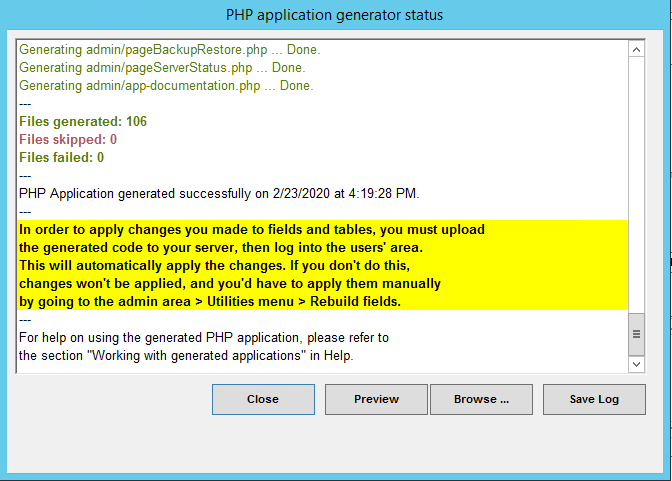
The files list of the generated files window is now cleared before regenerating the app to prevent duplicate listings.
Server-side programmatic improvements
Added getRecordOwner($tn, $pkValue) to retrieve the owner's username for a given record.
Added tableRecordOwner($tn) to retrieve the lookup
field name that determines the record owner (or null for the default
case where the current user is the owner of the inserted record).
Other changes
The link to import CSV in the admin area now points to the user's
area CSV import tool (the admin area CSV import tool is deprecated and
will be removed in future releases).
Removed the AppGini version from comments at the beginning of
generated files to minimize file changes reported in diff tools when
updating the app to a different AppGini version.
AppGini 23.17, Dec 16, 2023
New features
Add new tool to automate installing plugins (Admin area > Plugins menu > Install a plugin)
UI/UX enhancements
Unify plugins icon height in plugins menu
Better alignment of date and lookup fields in detail view
If a PK field is editable, mark it as required in detail view
hide empty image upload toolbox in read-only mode
Fix layout of tech docs window in high DPI screens
Fix layout of preferences window in high DPI screens
Fix layout of file upload window in high DPI screens
Fix image upload window layout in high DPI screens
Fix theme preview link
Fix theme preview window layout in high DPI screens
Fix icon selector window layout for high DPI screens
Bug fixes
Fix bug in creation statement of membership_cache table.
Include hidden/read-only lookup fields in INSERT query if used as filterer, adding it to $data array before passing to before_insert hook.
Server-side programmatic improvements
Add httpRequest() function to launch HTTP requests, with headers and cookies support.
Add updateField() function to create or update specified field only if necessary
Add addIndex() function to create or update specified index only if necessary
Add support for WindowMessages class to allow displaying messages to users on the next page load from within hooks.
Performance enhancements
Don't recreate membership fields/indexes unless they don't exist or have changed. Ignore otherwise to prevent slow queries.
AppGini 23.16, Oct 17, 2023
UI/UX enhancements
Apply user's locale to moment on page load.
Fix demo message hit area on high dpi screens.
Fix query helper dialog height issues on some screen resolutions.
Base default icon size on screen DPI instead of assuming a specific size.
Fix cropped variables list in calculated fields pane in high DPI screens.
Better eye icon (Settings > Upload key).
Remove twitter icon and add change log link in help menu.
Add large table view icons (for high DPI screens).
Add empty cells corresponding to child info columns in the sum row under table view.
Fix upload progress bug when reaching 100%.
Remove changes scan progress % which is inaccurate and unpredictable, show 'please wait' instead, and show hourglass.
Adjust toolbar icon sizes to 32 (small) and 64 (large).
Bug fixes
Fix retrieval and caching of YouTube and google map fields when app encoding is 4-byte UTF8.
Graceful handling of errors in custom lookup queries.
Don't cache numbers in makeSafe() to avoid cases like '3.5' being equivalent to '3' in array indexes.
Preserve decimals for floats styles using locale-float CSS class.
Fix YouTube thumbnail dimensions in some scenarios.
Fix non-Latin child info column titles.
Fix issue in save_config().
Create server dirs recursively in file-uploader.php.
Correctly detect https connections when running behind a proxy (fixing redirection issues when trying to access admin area, children count errors, and issues during copying of child records).
Hide empty child info column when generating app from projects saved prior to 23.15.
Client-side programmatic improvements
Update moment.js to latest release.
AppGini 23.15, Sep 14, 2023
New features
Show child info columns in the table view, displaying the count of child records, and allowing users to add new
child records directly from the parent table view.
Prevent right-aligned fields in non-default TV layouts from being too wide.
Make selected records in TVDV bold to distinguish them better.
Update calculated fields if children count is updated in TV, TVP.
Make parent/children settings dialog resizable and Preserve its width in app config.
Remove the listbox of child links from table properties as this option has been moved to the parent/children settings dialog.
Hide non-applicable record ownership filters in the filters page.
Force min height for html editor.
Add support for high DPI screens in AppGini.
Admin view groups page: Hide 'Prev' link in first page, and 'Next' link in last page.
Bug fixes
Fix 'back' link behavior in error messages displayed in modal windows to close the modal rather than do nothing.
file-uploader.php: Better detection of secure connection when using trusted proxies.
Security fixes
Upgrade PHPMailer to latest release (v6.8.1).
Server-side programmatic changes
Add getLookupFields() to retrieve full configuration of lookup fields (refactored from parent-children.php to be available programmatically to other modules).
Add getChildTables() to retrieve child tables of a given parent table.
Fix 'back' link in error_message() to close modal window rather than do nothing if the message is displayed inside a modal.
Add Request::array() to preperly retrieve data sent as an array in requests.
Fix return data type docstring of loadView().
Add json_response() to send a standardized success/error response.
parent-children.php: code refactoring + handle get-count operation to retrieve children count of multiple parent records.
Add ctype_alnum() implementation (which is needed by PHPMailer) if not present in current PHP installation.
Auto-load PHPMailer.
Client-side programmatic changes
Prepend child- to column class name for child info columns in table view.
Add AppGini.config object, which currently includes the following keys and their corresponding values: imgFolder, url and uri.
Replace AppGini.imgFolder with AppGini.config.imgFolder.
Add AppGini.Translate.apply() method, which translates page content. It works by looking for container elements that have the attribute data-translate and replaces their content with the translated string corresponding to the key is specified in the attribute.
AppGini.Translate.apply() also looks for elements with attribute data-title and sets their title attribute to the translated string corresponding to the key is specified in the attribute.
Open links that have modal-link class in a modal window. Window title is set to the title attribute or, if not present, the link text.
Add AppGini.updateChildrenCount() to periodically update child records count in TV, TVP (pass false as parameter to update once without scheduling more updates).
Add childrenCountChanged event to the document object. Triggered whenever child records count changes.
AppGini 23.14, Aug 21, 2023
New features
Add 'Update calculated fields' page to admin area to allow batch updates easily through GUI
Reduce file size, improve performance and consistency of large database backups
UI/UX enhancements
'Send mail' page: show recipient count, hide too many recipients if
recipients count less than 100
UI/UX enhancements in groups and members list pages
Fix RTL layout issues in some pages
Bug fixes
Fix undefined is_xhr() error in db backup page
Fix errors in displaying some translated strings
Security fixes
Force image captcha in setup page to prevent accidental/malicious bot submissions
Hide db password when logging mysqldump command
Server-side programmatic improvements
Add Captcha class, with support for image captchas and Google Recaptcha (see documentation and examples in resources/lib/Captcha.php)
Support for autoloading namespaced classes in linux
AppGini 23.13, Jun 25, 2023
New features
For image upload fields, allow mobile users to capture photo via camera (watch short video demo).
Link to admin settings page for changing password of super admin.
Smarter caching of js and css files (auto reload on file changes without having to hard refresh).
Enhanced UI for image/file upload field in DV.
[Privacy] Add 'do not track' (DNT) to twitter widget in admin area.
Bug fixes
Fix bug in tablename_csv() hook function not receiving memberInfo array.
Fix PHP warnings in DataList class.
Prevent freezing while scanning for file changes before uploading app.
Fix returned json from getUsers.php causing error in users list.
Fix returned json from ajax_combo.php causing error in default lookup values.
Client-side programmatic improvements
Add AppGini.createCSSClass() js function to create a CSS class with the provided name and properties, based on selected properties from one or more existing CSS classes.
Add rtl-mirror CSS class to an element to horizontally flip it in rtl (e.g. arrow glyphs, ... etc).
Other changes
Minor performance enhancement in setupMembership().
Various code quality improvements.
AppGini 23.12, Jun 03, 2023
UI/UX enhancements
Add-ons menu: Add DataTalk and discount links, fix SPM link.
Bug fixes
Include browser headers in file upload requests to prevent bot blocking by server firewalls.
Add type checks in save_config().
Fix file uploader to allow connections from secure proxies (e.g.
cloudflare, k8s ingress, containers behind nginx proxy, .. etc).
Return separate error messages from file uploader for invalid upload key and insecure connection.
More upload log details.
Make all loops in app uploader non-blocking to avoid freezing on slower PCs.
Security fixes
Security fix: Enforce access prevention to .sql backup files in .htaccess.
Add more action buttons to project properties pane (view files and upload).
UI/UX enhancements
Change wording of 'Preview/run app' to 'Run app locally' for clarity and since we can now also offer run app from server
Rename some buttons in generated files log window for clarity.
Support for displaying username beside the profile icon in the top navbar. To enable it, add this to hooks/header-extras.php: <style>.profile-menu-text { display: inline; }</style>
In generator status window, remove the warning about applying changes when no field/table changes are present
Bug and security fixes
Prevent potential SQL injection vulnerability in admin/pageViewMembers.php
Don't allow values like \ in $appURI in config; replace with / (this mainly happens on wampp)
Users from a group that can edit group/owner records can't edit their own records if the PK field is set as zero-fill.
Don't overwrite config files inside add-ons folder when installing a new version of AppGini to preserve customized settings.
AppGini 22.14, Jun 14, 2022
New features
Add ability to edit HTML source in rich editor.
Add support for custom MySQL port number in setup and db config, with fallback to port number set in php.ini.
UI/UX enhancements
Add a link to query error log in pageRebuildFields.php to help debug failed fixing of a field.
When reporting an SQL error to admin, add clickable link to pageRebuildFields.php.
Add button to manually recheck database connection in setup.php.
Improved appearance of 'submit' button in rich editor dialogs.
Prevent flicker of tv-tools buttons on page load.
Bug fixes
Attempt to create table with a single dummy field (_dummy_deletable_field) if table creation fails. This makes it possible to fix the table in pageRebuildFields.php.
Fix: records that have invalid field values can't be deleted.
Fix a unique index length issue that prevents creating the membership_userrecords table under some MySQL configurations.
Fix: handle NULL comparisons correctly in prepare_sql_set() in both INSERT and UPDATE cases.
Add support for array values in prepare_sql_set() to build IN (values) WHERE conditions.
Client-side programmatic improvements
Add AppGini.addToProfileMenu() to allow adding new
links and dividers to the user's profile menu. Links are currently
appended to the end of the menu, but in future releases, specifying a
position might be supported.
Remove special support for old IE browsers
AppGini 22.13, Apr 22, 2022
New features
Better context help, with updated and clear screenshots to make it easier than ever to use every feature of AppGini.
Support for emojis and other 4-byte unicode symbols by implementing utf8mb4 database encoding, with a conversion tool in 'Rebuild fields' page. More technical details at https://mathiasbynens.be/notes/mysql-utf8mb4
Set default encoding for new projects to '4-Byte UTF-8'.
Better theme previews: when previewing a theme in the theme window, the live online northwind demo is opened, with the selected theme applied.
Support for webp images in image upload fields (webp thumbnails can be created only on PHP 7.1+).
UI/UX enhancements
Compact 'sign out', profile link, and keyboard icon into a single profile menu.
Improved UX for Youtube and Google Maps options window.
Smarter app generate nudge when schema changes (won't nudge if project not yet generated).
If DV has a visible alert, don't scroll to focused element to avoid user missing the notification.
More meaningful color hints in generated files window.
Set redirect after insert to be empty by default. And if so, use default redirection after inserting records.
After inserting a new record, if user has view permission, and no custom redirect url is set, select inserted record.
In case of insertion error, show error inside page template.
If not in embedded mode, and user has insert only but no view/update/delete, remove 'back' button.
Show notification alerts above other form elements rather than hidden behind them.
UI: show specific table icon rather than a generic one in child table links on top of DV.
Move field data type guidelines to help section, removing them from field props pane.
Vertically align TV title and quick search box.
Adjust date drop-down styling to match the app theme.
Bug fixes
db.php: better connection error handling.
Fix images aren't removed from records if the option to preserve uploads is checked.
Allow editing of date fields if user has insert but no edit permission AND save as copy is enabled.
If user has insert but no edit permission and no 'Save as copy', lookup fields should not be editable in DV of existing record.
Fix display bugs under localization settings on Windows 11.
Append AppGini version when loading AppGini js and css files to make
sure changes to them in new versions of AppGini are applied without
users having to hard-refresh pages.
Skip setupMembership() for guest users (empty session) and when executing ajax-update-calculated-fields.php to avoid unnecessary db load.
Bug fix: Prevent multiple sandbox attributes from being added to iframe when pasted into nicedit.
Programmatic improvements
Server-side
Add Authentication::isGuest() to indicate whether current user is guest
Add SHOW VARIABLES output to database status dump in 'Server status' page.
Client-side
Add new CSS classes, .flip-horizontal and .flip-vertical that can be added to .glyphicon to variate icons.
Other changes
Updates to readme.txt (displayed during the pro setup).
Security fixes
Don't include inserted record ID in redirection URL if user has no view permission an no custom redirection URL configured
AppGini 22.12, Feb 24, 2022
New features
New project option under security settings: All members of 'Admins' group can access the admin area.
Query
logs page: show hint that logs older than x days are automatically
cleaned up, with a button to clean up slow queries, and another for
error queries.
UI/UX enhancements
Check uniqueness of editable primary key fields and show error accordingly, preventing submission of DV.
Show 'loading' icon on 'save changes' and 'save new' buttons in DV during blocking checks.
Apply locale formatting to column sums.
Update last record and record count when deleting records in TV using mass delete.
Easier to read file extensions list in upload field config window.
Use flex layout to fix the layout of lookup drop-downs.
Apply flex layout to date pickers to have the same alignment as lookup drop-downs.
Unicode support for table group button in table properties pane.
Extend validity of CSRF token to avoid need to frequently refresh SPA pages.
Bug fixes
Prevent loss of default value for fields hidden in DV on update.
Fix links to uploaded files not working inside modals.
Fix thumbnails failing to load images when opened inside a modal window.
Fix: Auto value editingDate displays a wrong date for records that haven't been edited yet rather than being empty.
Fix loader taking too long in read-only DV.
Fix: Empty date field is displayed as zeros in DVP and read-only DV rather than just blank.
Programmatic improvements
Server-side
Add new PHP constant, APP_VERSION in definitions.php that contains the AppGini version for the current app.
Add Request::oneOf() to limit a request variable to specified values or a default if one of them or not set.
Client-side
Automatic locale formatting for numbers wrapped inside elements having locale-int or locale-float CSS classes (can be disabled by setting the JS property AppGini.noLocaleFormatting = true).
Other changes
Clarify how column width is applied in context help
AppGini 22.11, Jan 25, 2022
New features
Add translation tool (Admin area > Utilties menu >
Translation tool) to make it easier to translate the interface of
AppGini apps without manually editing language files.
UI/UX enhancements
Prevent clipping of permission dropdowns in group editor page in admin area
If a project has not been generated yet, don't prompt to remove field from db when deleting a field.
Remove from empty descriptions in list of groups in admin area
Add hidden visibility style to #EnterAction button to prevent displaying it in several scenarios.
Show child records count in a badge in tab title, both in detail view and print preview
Add anonymous icon to the 'continue browsing as guest' link
Change the height of sizer div below navbar to accommodate navbar height
Bug fixes/misc.
Typo correction in language files: 'occured' => 'occurred'
JS API > agModal()/modal_window(): accept new parameter show to define a callback to execute after showing the modal (equivalent to bs.modal.shown)
Accept multiple email links in child tabs
Document noAnimation option in the comment for modal_window() in common.js
Refactor checkMemberID.php to avoid sending the entire html when the call is an ajax request.
New utility in Admin area: Interactive SQL queries tool (accessible from the Utilties menu).
This is a great way to run quick queries to retrieve info from the database. You can bookmark the
queries to run them later. Here is a quick demo:
To enable interactive SQL queries utility, check the option "Allow admin access to interactive SQL tool" under "Security settings" in your AppGini project:
Bug fix: when overwriting an already-existing generated file, delete original file to ensure correct file name case.
Bug fix: corruption of special characters in table groups when deleting a group.
UX: refocus left treeview pane after table/field rename error.
Bug fix: redirect after insert doesn't update renamed table name in some cases.
Fix csrf token issue preventing deletion of parent records after user confirmation.
Fix bug with handing of old dates in date fields.
AppGini 5.98, Nov 1, 2021
UI/UX enhancements
On closing a parent modal opened from child DV, reload auto-fill lookups linked to that parent.
On creating a new table via updateDB.php, automatically make it fully accessible to admins group.
Polished AppGini icons.
Special project browser icon for checkbox, upload, text/html, and calculated fields.
Admin area > query logs page: show count of slow and error queries on the navigation titles, and turn into tabs for more intuitive UI.
Update Google API key warning to reflect recent move of config into admin area > admin settings.
Add 'Reset' button in media tab to make it easy to reset the link behavior of a field.
Format slow/error query before logging (trim, no indenting)
Fix issue with updating calculated fields in TV pages that have a huge number of records.
Show table icon name on mouse hover in the table icons window.
Improved UI in homepage buttons that allow insertion.
Bug fixes
View/Rebuild fields page: Create any missing tables before attempting to create missing fields.
Escape back slashes in option lists to prevent incorrect storage.
Contents of option lists trimmed before populating drop-downs to prevent false 'no matches found'.
In TVDV, if user has view but no insert permission, prevent false 'access denied' warning.
Fix admin username validation in setup.php not working correctly.
Flush cached config after updating.
Update record ownership on renaming admin and guest users in admin settings page.
Ignore rather than log duplicate key errors during configuring admin and guest users/groups
Avoid unnecessary error logging of alter membership* tables queries.
UI fix for hidden submit button preventing showing it under some custom scenarios.
Avoid incorrectly escaping double quotes in default values.
sendmail(): disable SMTPAutoTLS if no encryption is set in mail settings.
Disable SMTP auth if no smtp user/pass provided
Fix issue when searching for '0'.
Security fixes
When deleting a user from the admin area, also delete their special permissions and sessions to avoid takeover by a user having same name later.
Delete records only if either a csrf or jwt token is provided.
Protect pageBackupRestore.php against CSRF.
Protect pageChangeMemberStatus.php against CSRF.
Protect maintenance mode against CSRF.
Fix low severity stored xss in signup page and various others.
Fix stored xss issue in nicedit (sandboxing iframes).
Prevent directory browsing of various resource folders.
Revert isEmail() function to use regex rather than PHP filter_var which is vulnerable to xss.
Fix stored xss in profile page.
Fix low severity stored xss in admin/pageViewMembers.php
Fix stored XSS vulnerability in nicedit.
Fix low severity stored XSS in group name.
Fix high severity stored XSS in pages that fetch a lookup value in some scenarios.
Fix XSS in admin > view groups and in user profile page.
Fixed stored XSS issue in tablename_autofill.php.
Fix low severity stored XSS vulnerability in admin/pageViewMembers.php.
Fix low severity stored XSS vulnerability in membership_profile.php.
Fix reflected XSS vulnerability in membership_passwordReset.php.
Fix low severity stored XSS in admin/pageViewGroups.php.
Fix CSRF vulnerability in admin/pageDeleteGroup.php, admin/pageDeleteMember.php and admin/pageDeleteRecord.php.
Programmatic improvements/changes
Server-side
Support for configuring max and min years allowed in date fields via hooks: In hooks/tablename.php or hooks/__global.php, add this in the global scope (outside any function definitions):
// Change tablename and fieldname to actual table and field names
define('tablename.fieldname.MinYear', 2010);
define('tablename.fieldname.MaxYear', 2030);

// Dynamic dates also works:
define('tablename.fieldname.MinYear', date('Y') - 1); // = last year
define('tablename.fieldname.MaxYear', date('Y') + 2); // = 2 years ahead
Implement json=1 param in ajax_combo.php to force json output regardless of lookup type, useful to handle radio lookups correctly in SPM and mass update plugins.
ajax_combo.php: Accept optional ut=1 param to return unique values, useful for SPM search page.
New functions in admin/incFunctions.php: array_trim(), request_outside_admin_folder(), breakpoint().
New constant DEBUG_MODE.
Refactoring: Implement resources/lib/Authentication.php which defines an Authentication class to package all auth related code in a single class.
Move global app constants to a centralized definitions.php file, available to all 3 modes of app (users, admin area, setup).
Timezone is now a constant defined in definitions.php rather than a hard-coded value.
hooks/__bootstrap.php is loaded in all 3 modes of app rather than just users.
Add validMySQLDate() to validate a MySQL-formatted date.
Fix inconsistent behavior of parseMySQLDate().
getUploadDir(): make argument optional, defaulting to ''.
admin/incFunctions.php: include field caption and description in schema data returned by get_table_fields()
Client-side
Add AppGini.version to retrieve AppGini version in JS.
Other changes
checkAppRequirements(): Require PHP 7.0 or above. Require iconv functions.
Many code refactorings to better architecture and allow future improvements.
AppGini 5.97, Jun 13, 2021
Fix SameSite value of remember_me cookie for future compatibility with browsers.
Re-order admin utilities menu for better organization.
Add pageQueryLogs.php to view log of slow and error queries for debugging (Admin area > Utilties menu > Query logs)
Add 'nothing' table icon (useful when you want no icons for a table)
Refactor tablename_view to delegate code for applying membership permissions to DataList.
Add DataList::applyPermissionsToQuery() and DataList::fieldIsDateTime().
Refactor various parts of DataList.
Fix filtering query error for non-admin users that don't have full view permissions.
Add logSlowQuery() and logErrorQuery() functions to help diagnose problematic queries executed by sql().
Refactor sql() function by separating dieErrorPage() and openDBConnection().
Add new options to the $o array passed to sql() to suppress logging if set to true: 'noSlowQueryLog' and 'noErrorQueryLog'.
Add CSS classes .signed-in-as and .username to the 'Signed in as ..' text and the username link in the navigation bar for easier scripting.
Fix issue where TVDV page with 0 records in TV has missing date pickup components.
Render read-only checkboxes in DVP in all cases.
makeSafe(): return an empty string for 0-length inputs without further checks.
AppGini 5.96, May 17, 2021
UX fix: don't automatically sign out a user when they access a table they have no access to.
Show 'table access denied' error if user is accessing a DV record they don't have access to, rather than a blank page.
Fix issue with empty lookup values for lookup fields of short char/varchar datatype.
CSS rule to hide empty email links.
Show "Don't rename uploaded files" and "Delete files from server when removed from record" options in image options window.
checkMemberID.php: change the way availability is reported to prevent minifying services that strip comments from ruining the result.
Render read-only (rather than editable) check-boxes in DVP.
Enable auto-increasing rich editor height for long content.
Add more randomness to generated file names by randomly seeding microtime() to hinder brute force filename guesses.
Sanitize filterer_* against reflected XSS in 'Add new' form.
Misc syntax fixes.
AppGini 5.95, Mar 29, 2021
UI/UX enhancements
Remove empty images from DVP
Align sum cells the same as their corresponding data cells.
Fix tooltip appearance in admin/pageRebuildFields
Fix and improve UX for inserting joins in query helper window
Better handling of DV loader (no compile time vars, show only if there is a non-native focus field, don't show in TVDV unless a record is selected, hide once focus field is ready instead of waiting unnecessarily for > 1 sec.)
Focus form field in TVDV if a record is selected.
don't focus DV on load if in same page as TV.
Improve appearance of file overwrite window.
Show insert button for lookups in embedded mode.
Fix nicEdit (rich HTML area) height
Bug fixes
Ignore not null for auto_increment fields when comparing in admin/pageRebuildFields.php
Add assocArrFilter($arr, $func) PHP function -- filters provided array using provided callback function. The callback receives 2 params ($key, $value) and should return a boolean.
Add bgStyleToClass() PHP function for converting background-color style attribute applied by nicedit into a class to prevent potential XSS injection.
safe_html() applies bgStyleToClass() before xss cleanup.
Client-side
Add .sum CSS class to sum row and each sum cell in TV.
Add new param doActionOnTimeout to AppGini.once() js function. If set to true, execute action on timeout.
Add AppGini.applyNiceditBgColors() js function for applying background highlight color to elements having nicedit-bg CSS class.
Add optional timeout config param to AppGini.once() to abort checking condition after specified msec.
Add AppGini.unixTimestamp() js function to retrieve current unix timestamp in sec, msec.
Include .container-fluid in common.js styling whenever a rule's selector is .container
Include .container-fluid in dynamic.css styling whenever a rule's selector is .container
AppGini 5.94, Jan 21, 2021
Fix 'no direct access allowed' in CSV import page.
AppGini 5.93, Jan 20, 2021
New features
Add new table property Default focus field to allow control over which field (if any) has focus by default when the detail view form is loaded (Previous behavior was to always auto-focus the first editable field).
Implement instant search in admin settings page to quickly find a setting by label.
Move the setting of the file upload path to the admin settings page, making it more convenient to change.
UI/UX enhancements
Add button for clearing date fields in detail view.
Usability and layout fixes to admin/pageSettings.php
Add some space between plugin icon and name in plugins menu
admin/pageTransferOwnership.php: prevent moving super admin user to non-admin group, or any user to anonymous group
Move server-side code from common.js.php to header.php, and rename as common.js for better performance through native server/browser caching.
Remove misleading help mouse pointer from title bars of table props section.
trim option list separators from start and end of options list to prevent unintended empty options.
Add autocomplete="new-password" for new password fields in app pages to prevent browser auto-completion (this prevents pre-filling passwords, but not password suggestions).
Add checks during setup for PHP extensions: xml and mbstring, and a more descriptive error message if images folder is misconfigured.
Fix bottom margin of field description in detail view.
Adjust glyphicon size for download links using new CSS class .glyphicon-lg
Adjust icon links alignment/margins in detail view for a more consistent UI.
Rename dynamic.css.php to dynamic.css for speedier processing and better loading performance.
Center alert text in admin/pageEditMember.php.
Don't show link to pageRebuildThumbnails.php in admin Utilties menu if app has no thumbnail fields.
admin/pageSettings.php can initiate a search through the URL GET parameter search-settings to allow direct linking to a specific setting from other admin pages.
Proper autofocus for date fields.
Fix layout of web link input field in detail view.
You can now navigate between the project browser, the search box and the properties pane in AppGini using either F6 or F4 shortcut keys.
Project inspector (F12) now displays field and table names on the main field/table nodes for easier/quicker access.
UX enhancements when user clicks the label for date, link, YouTube and google map fields.
If user specifies that a link field displays the contents of another field, they must specify the other field.
More descriptive message for field changes warning when closing AppGini without regenerating app.
Show warning message when trying to import a table from a CSV file while no project is open.
admin/pageViewRecords.php: support for {none} member, indicating ownership records having no member.
Bug fixes
Fix technical documentation preview issue.
Fix modal height bug on iOS.
Fix bug in YouTube thumbnail URL.
bug fix in refactored datalist.php.
Fix bug in combo class.
Quick search: fix highlight behavior when no matches are found.
Fix js bug in admin/pageViewMembers.php that prevents confirmation dialog when deleting a user.
Admin homepage: indicate and correctly handle ownership records with empty username.
Fix bug in Save changes button locking behavior during ajax requests.
Fix YouTube videos error due to YouTube API change.
Properly close <form> and grid in filters page.
Avoid invalid HTML in file upload fields.
If field is configured as a lookup and image simultaneously, remove image config and prioritize lookup config to consist with UI and fix generated code js error.
Handle error when homepage panel height is set to invalid value.
Fix: separator between parent caption fields appears twice in lookups if parent caption field is itself a lookup field.
Security fixes
Update CI_Input to prevent recently revealed XSS vulnerabilities, CVE-2021-21260.
Move the setting of Google Maps API key to the admin settings page (storing it in config.php) to prevent hard-coding the API key into generated code, making it safer to distribute your app to third parties.
Prevent potential minor reflected XSS vulnerability in CSVImportUI.php.
Programmatic improvements
Server-side
Use getLoggedAdmin() whenever checking for admin access rather than getMemberInfo()['admin'] to ensure the admin check is centralized.
typo fix in admin/pageUploadCSV.php.
Fix for the case where ctype* functions are not included with PHP.
Fix some PHP8 compatibility issues.
Use PHP's built-in filter_var() to validate emails in isEmail() instead of hard-to-maintain regex.
Code refactoring in admin/pageRebuildThumbnails.php and ensuring usage of configured image upload path rather than a hard-coded one.
Use <%%BASE_UPLOAD_PATH%%> placeholder in templates instead of <%%TRANSLATION(ImageFolder)%%>.
Refactor DataList::templateTranslate() method to parseTemplate() function in admin/incFunctions.php.
Client-side
Add new CSS spacer classes: tspacer-* (top spacer), bspacer-* (bottom spacer), lspacer-* (left spacer, RTL safe), rspacer-* (right spacer, RTL safe), where * is one of xs, sm, md or lg.
Replace AppGini.focusFirstFormElement() js function with the more versatile AppGini.focusFormElement(tn, fn).
Add optional 2nd parameter shift to AppGini.scrollToDOMElement() to specify a shift value, useful to make scrolled-to DOM element more visible near the mid of the screen rather than on top.
Use AppGini.imgFolder in js instead of AppGini.Translate._map['ImageFolder'].
Add id attribute to read-only YouTube, google map and web/email link fields.
Other changes
Remove Google Maps API setting from AppGini preferences window (since it's configurable from admin settings page now).
Update http links to https counterparts.
AppGini 5.92, Nov 10, 2020
Fix bug where applying quick search + filters caused an error.
Fix error message when default value of a field contains single quotes
Append DV next/previous buttons to the first .btn-toolbar only to avoid duplicates if the page contains multiple .btn-toolbar elements.
Disable special handling of Ctrl + right/left arrow when inside a non-empty input/textarea
AppGini.inputHasFocus(): detect focus in inputs and contenteditable elements.
Add vertical spacer between child link buttons on top of DV for better UI with many buttons that wrap.
Fix bug occuring with users having insert and no view permission.
If user has insert-only access (and no view) to a table, redirect to DV form after insertion rather than to a blank page.
Fix bug with validation and focusing of required rich text fields
UX enhancement in import-csv.php: if user manually clicks #start-upload, hide timer
AppGini 5.91, Nov 1, 2020
Usability enhancement: In detail view pages where both 'Save changes' and 'Save as copy' are enabled, add a lock button to 'Save changes' that allows user to disable 'Save changes' button to avoid clicking it by mistake when they actually mean 'Save as copy'.
Performance improvement: combine all calculated field ajax calls of TV and child tables into a single call rather than one call per record.
Display a link to keyboard shortcuts reference page in the keyboard reference modal.
Fix DV layout bug for fields that have the option 'Column width' checked (introduced after adding .tablename-fieldname CSS class to DV inputs).
Fix guest navigation and signup issue.
Fix bug in admin/pageEditMember.php that prevents saving changes.
Fix bug where __global.php hook functions were not executed properly.
Fix disappearing .warning class issue in TV rows when added programatically.
pageBackupRestore.php: Show mysqldump command on error (redacting db password)
CSV preview page: prevent new lines in field separator and wrapper.
AppGini 5.90, Oct 26, 2020
Add new CSV import tool that allows non-admin users to import CSV files (if their group settings permit so) into tables they have insert/edit access to.
Implement Next/Prev navigation in detail view.
New usability feature: Implement keyboard shortcut keys in users area (Ctrl + F1 or Shift + F1 to display available shorcuts).
Add %TABLENAME% and %PKFIELD% placeholders in calculated field query.
Add support for Powerpoint file types for file upload fields.
Super admin can always mass-delete, filter, save filters, sort, print, print DV, save as CSV regardless of table options set in AppGini (these still apply to other users, but no longer to super admin).
Remove language-admin.php and merge its contents into language.php for a unified translation file.
Add Open app icon (shortcut: SHIFT + F5) to open current AppGini app in browser (as last generated).
If app title already includes UPPERCASE characters in AppGini, leave case as-is.
Passing noQuickSearchFocus=1 when linking to a table view prevents auto-focusing of quick search button. This is useful when you embed a table view in another page and don't want the browser to "jump" down to the embedded page.
Fixed: Radio lookups: 'view parent' link not working.
Fixed: In-page validation for required radio button lookups/option lists.
Fixed: Save flag not triggered when moving field up.
Added hide all and toggle buttons to column toggle menu.
Fixed count() warning on PHP 7.2.x
Fixed vertical spacing of date combos.
Added link to YouTube channel on the toolbar.
Fixed datetimepicker European date formats.
Fixed bug in sql() function causing Notification::placeholder() not to be declared on silent errors.
Unified utf8 conversion functions to use to_utf8() and from_utf8()
Fixed utf8-related bugs in select2 drop-downs and auto-fill lookups
Fixed image caching issues in thumbnail.php
AppGini 5.71, May 24, 2018
Implementing datetime picker for datetime fields
Unicode-friendly copy/paste of tables and fields
Shortening columns cookie name to avoid 'bad request' errors,
Improved responsiveness of 'Edit theme' dialog to prevent freezing
Fixed: Record permissions are not honored in children view in some cases
Fixed: image upload fields don't display the image if no renaming and file name contains a hyphen.
Fixed image lookup DV issues
Set column hide/show cookies to expire after 30 days rather than on closing the browser.
Fixed a bug with image uploads in tables containing 2 or more image upload fields.
Fixed an issue with backups on servers having no MySQL password.
Fixed bug with show/hide columns dialog in vertical TV layout
Cleanup of some obsolete image files no longer used.
UX enhancements.
Allow long TLDs in email field of the activation window
Removed 'DB name' label from project page to avoid confusion
Fixing issue with initial values of auto value time fields.
Fixing issue with default value for time fields in 12hr mode.
Fixed issue with displaying empty time values in DV
inserting null in time fields if left empty when inserting a new record.
Changed the data type info icon to text, and also the lookup auto data type icon.
Updated the data type choice link to use the https version.
Added uninstaller icon (in Windows Add or Remove Programs dialog)
Prevent adding .alert-link to button links.
Fixed an activation bug validating emails with long TLDs.
Fixed bugs with sorting of lookup fields in child tables.
Fixed a bug where addslashes was incorrectly applied to cached auto-fill lookups, causing escaped quotes
Added html_attr_tags_ok() function and applied to cached auto fill data.
Added thumbnail caching to thumbnail.php (except for super admin user for administrative purposes)
Fixed issue with defining datalist_image_uploads_exist constant in datalist.php
Fixed issue with templates/tablename-ajax-cache.php where auto-fill lookups having parent images were not displayed correctly
Loading moment.js and bootstrap-datetimepicker in header.php
When saving filters, remove the FilterAnd for undefined filters from the filter URL
AppGini 5.70, Jan 23, 2018
Added database backup/restore page in the admin area (accessible under the Utilities menu).
Option to display the record count of each table in the homepage (to enable, select the table in AppGini and check the option Show record count in homepage).
New searchable drop-downs for lookup fields and option list fields.
Multiple-choice option lists are much easier to use now.
Major usability and UI improvements.
Various bug fixes.
AppGini 5.12, Aug 13, 2013
Removed unnecessary redirections for non-logged users.
Fixed a bug with characters above ASCII 128 not displaying correctly when using Unicode encoding.
Fixed a bug with sorting resetting filters if detail view is in the same page as table view.
Bug fix where lookup menus didn't display in detail view if user had insert permission but no update permission.
Fixed a stack overflow error when generating an application with complicated hierarchical lookup fields.
Fixed a bug with header redirection not working in some special cases.
AppGini 5.10, Jun 10, 2013
Enhanced and simplified setup page for generated applications.
Enhanced and simplified password reset process.
One-step application generation by pressing Ctrl key while clicking the "Generate" icon.
Added support for --generate command line option to generate AppGini applications without dealing with the GUI. This way, you can use batch files and integration tools to automate creating your application.
Enhanced copying/pasting of tables and fields to work across multiple instances of AppGini.
Applied pagination alignment to the top buttons to avoid horizontal scrolling to see those buttons on wide tables.
Added an option to remove "Powered by AppGini" footer (Pro version only).
Implemented displaying grand parent lookup values (lookups that point to caption fields that are in turn lookups now display the exact content of the parent lookups).
"Go to page" drop down in the table view now displays a partial list of pages for better performance with huge tables.
Lookups are now loaded using ajax to enhance performance for huge lookup lists.
Optimized the ownership assignment process (in the admin area) to take much less time when dealing with huge tables.
Added a link to download language files beside the encoding drop-down in AppGini.
Various bug fixes and usability enhancements.
AppGini 5.00, Dec 23, 2012
Support for parent/children views to access all children of a record from one page.
Easier and faster design of your database: Ability to copy and paste fields and tables within a project and between 2 projects.
Better application interface: Enhanced sign-in and and sign-up forms.
Selection of table icons from an icons gallery.
Choice between 2 homepage themes (classic and metro).
More database search power: users can now search for records owned by them or their group.
Control of the alignment of the pagination section below the table view (full-width, left- or right-aligned).
Major UI enhancements in both AppGini and the generated applications.
If user applies a filter to one or more fields, an indicator icon is displayed in the field title.
Many bug fixes, usability enhancements, and elimination of most cross-browser inconsistencies.
Bug fix in some of the generated files to work with PHP installations that don't support short_open_tag
AppGini 4.80, Aug 6, 2012
Multi-level cascading drop-downs (for example, selecting a model from the car models drop down filters the car make drop down).
New metro-style home page.
Redesigned login page (please make sure to apply a theme to your old projects to take advantage of the new design).
Member profile page (where users can view and edit their profile, change their password, and view their permissions).
Easier page navigation in all views.
Sorting of tables in AppGini.
Filters pages redesigned.
Easier code generation procedure (new folders are automatically created, smarter output folder guesses).
New member notification email contains all member info.
Various usability enhancements and bug fixes.
AppGini 4.70, Jan 27, 2012
Added support for time zones.
Added "maxlength" parameter to form inputs to limit input size based on max field length.
Easier quick search by just clicking <Enter> rather than having to click the search button.
Added option to highlight a field/table in AppGini to easily refer to it later.
Updated Prototype and Scriptaculous javascript libraries to the latest release.
Various usability enhancements and bug fixes.
AppGini 4.61, Oct 30, 2010
This is a maintenance release that includes various bug fixes.
AppGini 4.60, Oct 1, 2010
Better themes management: A new theme editor in AppGini makes it much easier to modify the application appearance. Also, we added some new better looking themes.
Usability enhancements:
Users can now resize text areas by merely dragging their bottom border.
Added an automatic description for upload fields showing the allowed upload size and accepted file types.
Long drop-down combos are now automatically replaced by auto-complete text fields to make it easier for users to search them by simply typing part of an item.
Easier and more powerful customizations:
You can now customize the query for lookup fields to control the contents of the drop down.
A new hook file to add customized javascript code to control the behavior of forms. Please refer to the hooks documentation for more details.
You can now easily customize the filters page for each table, group, and even for each user. Please refer to the hooks documentation for more details.
Performance enhancements: drop down fields that contain a large number of items caused pages to slow down. This has now been fixed by automatically using auto-complete text fields if the number of items exceeds a certain limit.
Better support for non-Latin characters, and for right-to-left page layouts.
Added phone, 12-hour time, and Canadian postal code formatting to the available data formats.
Various bug fixes, security, and usability enhancements.
AppGini 4.53, May 7, 2010
This is a maintenance release that includes various bug fixes.
AppGini 4.52, Apr 12, 2010
This is a maintenance release that includes various bug fixes.
AppGini 4.51, Mar 8, 2010
More printing options: Added option to partially select records for printing them as a list (table view) or as details (detail view).
Added multiple selection option fields (users can select more than one value from a list box).
Create your database fields faster than ever before: When you create a new field and set its name to image, photo, comments, notes, date or id, AppGini smartly guesses the field properties so you don't have to waste time on this.
Increased performance and responsiveness of AppGini, various bug fixes and usability enhancements.
AppGini 4.50, Feb 5, 2010
Support for automatic creation of thumbnails for uploaded images.
Option to zoom thumbnails when clicked using lightbox2.
Added a javascript date picker for date fields for easy selection of dates.
Easier management of large projects: you can now type a part of the name of any field or table in AppGini to search for it quickly.
Enhanced security of data: You can now set lookup fields to inherit permissions of parent tables so that users can only see the data they have access to.
More convenient user login experience: Added Remember me option during login to avoid typing the username and password on every visit.
More flexibility and power to you: Added hook functions for easier customization of the generated application for adding new functionality. Check the easy-to-follow examples in the online help.
Usability enhancements and bug fixes.
AppGini 4.40, June 23, 2009
Support for rich HTML text area fields.
Implemented a printer-friendly detail view option.
Added option to display lookup field data as radio buttons (in addition to the drop-down menu option).
Added support for automatic values (values inserted automatically into read-only fields when inserting or updating records).
Enhanced the CSV data import feature.
Added table description property.
Added the option to open the last project from the start screen of AppGini for faster access.
For easier member signup, if only one group is available for sign up, it's now set as default in the registration form.
Various usability enhancements.
AppGini 4.30, Mar 3, 2009
Better support for international encodings and right-to-left languages.
The File menu now contains a list of the recently opened projects for quick access to your work.
AppGini can now add a table to your project using a CSV file.
The Data Format tab enables you to specify a special formatting for the selected field.
You can add description to each field in your project. This can be used as a help hint for your application users.
In the admin area of the generated applications, you can now populate any table with data imported from a CSV file.
Added support for enforcing a pre-selected parent value for a read-only lookup field.
Several usability enhancements, and better accessibility support.
AppGini 4.20, Sep 2, 2008
Added configurable option to notify admin by email when a new member signs up.
Implemented auto selection of appropriate value from lookup drop-down when child table is accessed from parent table.
Added option to display sum of column for numeric fields.
Support for updates and inserts using GET requests (to simplify integrating AppGini code with third-party scripts).
Several usability enhancements.
Reported bugs fixed.
AppGini 4.10, July 7, 2008
Members can now change or reset their passwords.
Auto-fill fields (fields that are automatically populated with data from another table -- see a video demo here).
Admin user can now sign in from the members area or the admin area, and an admin group is now automatically created that has full access to all tables.
Ability to define custom "quick lists" to be used for "option list" fields.
Support for friendly date formats in filters.
Changes to database structure after file generation are now applied automatically without having to run the setup script.
When performing a quick search, search terms are highlighted in the search results.
Various usability enhancements in both AppGini and generated applications.
Reported bugs fixed.
AppGini 4.00, March 17, 2008
Implemented membership sign-in system with group-based table permissions.
New re-organized and enhanced user interface.
MySQL2AppGini is now packaged as part of AppGini rather than a separate tool.
Table and field captions now support international character sets.
When using filters, "like" and "not like" now automatically translate to "contains" and "contains not" if no wildcards (% or _) are used.
Default data type for new fields changed to varchar(50) rather than integer.
Saving data to CSV files is now enabled in the freeware version.
Added full support for SSL connections.
Added option to sort generated tables list alphabetically.
Reported bugs fixed.
AppGini 3.40, August 18, 2007
Easier lookup fields, with the ability to combine 2 parent fields in one drop down.
Support for foreign keys that point to the same table.
Ability to specify output pages encoding.
Ability to search for "empty" and "not empty" fields in filters.
Enhanced project styles, with a new 3D look.
Fixed a bug where empty lookup field values caused records to be hidden.
Fixed a bug where clicking "Cancel" or "Deselect" in a separate detail view page caused resetting of filters.
Other reported bugs fixed.
AppGini 3.30, February 14, 2007
Ability to specify a default sorting field and direction for each table.
Support for check-boxes.
Date of today can be easily entered to date fields with one click.
Files in the overwrite window during code generation now sorted by file name for easier handling.
Alternating row colors in table view.
Fixed a bug where quick search with no results causes page numbering errors, plus other bug fixes.
AppGini 3.20, January 7, 2007
Ability to specify which files to overwrite and which to skip by checkboxes in a single window before code generation.
Option to easily access related children records from parent tables.
Support for web and email links.
Option to hide detail view till a field is selected, and to hide table view when detail view is selected.
Enhanced and more organized field properties page
Reported bugs fixed
AppGini 3.10, April 10, 2006
Ability to automatically apply field data type changes to your database
Ability to add new fields to your tables automatically and without any data loss
Better compatibility with PHP5 without changing php.ini settings
Ability to create radio buttons and list boxes
Enhanced and more organized field properties page
Ability to control whether fields are displayed as textarea or text boxes
Added a link to index page in the table navigation dropdown
Reported bugs fixed
AppGini 3.01, July 2, 2005
New XML-based file format (*.AXP) for easier editing and advanced control of code generation
Support for file uploads, and control on accepted file types.
Added an option to display links to uploaded files so that users can download them.
Next/Previous links in table view, and ability to navigate to any page.
Tamplate-based table view and detail view for easy customization of appearance.
Eastern Asian versions of Windows now fully supported.
Added the option to display the first n characters of a long field in the table view.
Easier method of ordering fields in AppGini.
Hyphens in database names now acceptable.
Each row in the table view is highlighted when the mouse passes over it for better readability.
Foreign and primary keys are more recognizable in AppGini now as they have different icons.
Added a tool to automatically convert old project file format (*.AGP) to the new XML format (*.AXP).
Added an option to delete uploaded files from server if the record is deleted.
Added an option to not change the name of the uploaded files.
Reported bugs fixed.
No change log is available currently for versions of AppGini earlier than 3.01.